Action link
Updated in October 2026
Use action links to signpost the start of a digital service or task.
<a class="nhsw-action-link" href="/apply">
  <svg class="nhsw-action-link__icon" xmlns="http://www.w3.org/2000/svg" viewBox="0 0 30 30" focusable="false" aria-hidden="true">
    <path fill-rule="evenodd" clip-rule="evenodd" d="M14.9624 0C7.23963 -9.67762e-05 0.77228 5.83503 0 13.4998H17.5038L11.5639 7.57487C11.053 6.97974 11.0873 6.0926 11.6428 5.53856C12.1982 4.98451 13.0876 4.95025 13.6842 5.4599L22.1955 13.9348C22.4802 14.2164 22.6403 14.5998 22.6403 14.9997C22.6403 15.3997 22.4802 15.7831 22.1955 16.0647L13.6842 24.5396C13.0977 25.1211 12.1504 25.1211 11.5639 24.5396C10.9809 23.9545 10.9809 23.0097 11.5639 22.4246L17.5038 16.4997H0C0.810961 24.5483 7.87407 30.5058 15.9656 29.966C24.0572 29.4263 30.2621 22.5838 29.9915 14.4991C29.7208 6.41445 23.072 0.000101624 14.9624 0Z" />
  </svg>
  <span class="nhsw-action-link__text">Action link</span>
</a>
{% from "action-link/macro.njk" import nhswActionLink %}
{{ nhswActionLink({
text: "Action link",
href: "/apply"
}) }}When to use action links
Use action links to signpost the start of a digital service or task. For example, users might need to change an appointment, order a repeat prescription or find a pharmacy.
When not to use action links
Do not use action links in forms. Use a button instead.
Do not use action links to link to another page or site. If you want to draw attention to a link, use inset text.
How to use action links
Keep action link text short. Start with a verb, for example: "Book a blood test" or "Order a repeat prescription".
Action links usually appear within in a block of text. You can also use an action link in a care card.
You can use more than 1 action link on a page, but avoid putting them close together. Leave enough space between action links so users can easily identify and select the right action.
Accessibility
The link colour and background colour contrast ratio is 5.76:1. This passes WCAG 2.2 success criterion 1.4.3 Contrast (Minimum), level AAA guidelines at that font size.
When using an action link on dark backgrounds, make sure all users are able to see the link. The background colour must have a contrast ratio of at least 4.5:1 with white to meet WCAG 2.2 Success Criterion 1.4.3 Contrast (Minimum), level AA (W3C).
Source
Learn more about Action links in the NHS England Design System.
Follow discussions about Action links on NHS England GitHub to see the latest updates and resolved issues.
Action link variants
Action link on dark backgrounds
<a class="nhsw-action-link nhsw-action-link--reverse" href="/apply">
  <svg class="nhsw-action-link__icon" xmlns="http://www.w3.org/2000/svg" viewBox="0 0 30 30" focusable="false" aria-hidden="true">
    <path fill-rule="evenodd" clip-rule="evenodd" d="M14.9624 0C7.23963 -9.67762e-05 0.77228 5.83503 0 13.4998H17.5038L11.5639 7.57487C11.053 6.97974 11.0873 6.0926 11.6428 5.53856C12.1982 4.98451 13.0876 4.95025 13.6842 5.4599L22.1955 13.9348C22.4802 14.2164 22.6403 14.5998 22.6403 14.9997C22.6403 15.3997 22.4802 15.7831 22.1955 16.0647L13.6842 24.5396C13.0977 25.1211 12.1504 25.1211 11.5639 24.5396C10.9809 23.9545 10.9809 23.0097 11.5639 22.4246L17.5038 16.4997H0C0.810961 24.5483 7.87407 30.5058 15.9656 29.966C24.0572 29.4263 30.2621 22.5838 29.9915 14.4991C29.7208 6.41445 23.072 0.000101624 14.9624 0Z" />
  </svg>
  <span class="nhsw-action-link__text">Action link</span>
</a>
{{ nhswActionLink({
text: "Action link",
href: "/apply",
classes: "nhsw-action-link--reverse"
}) }}Use this action link variant on dark backgrounds where the standard action link may not provide enough contrast.
Examples
Welsh Immunisation System (WIS)
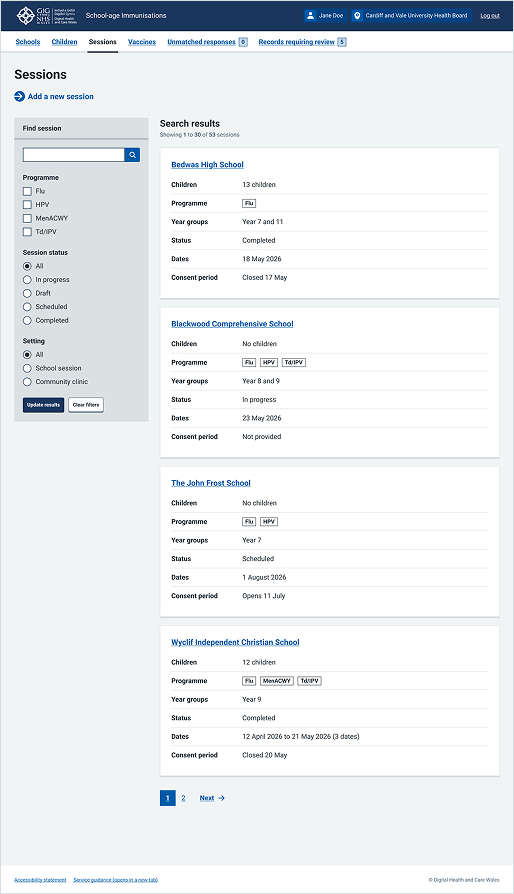
This example is from the School-age Immunisations service within WIS. It shows the action link at the top left of the page to signpost the start of the digital service.
Welsh Immunisation System (WIS)
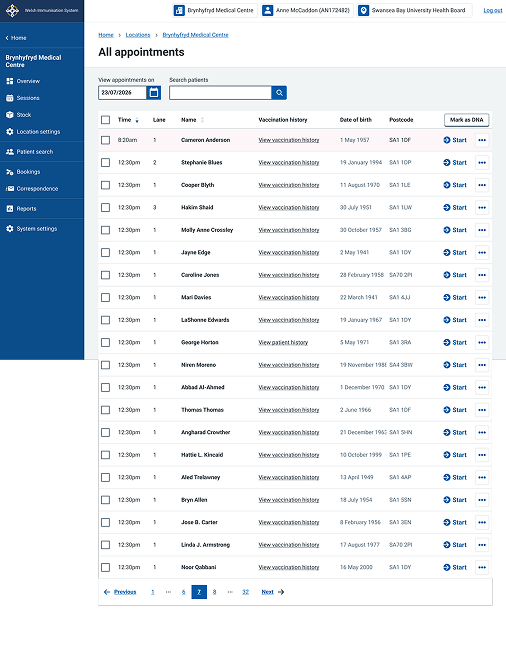
This example shows the "All appointments" overview page within WIS. It uses inline action links (the "Start" links accompanied by an arrow icon) within the appointments table to launch specific workflows.