Textarea
Updated in October 2026
Use textarea to let users enter more than 1 line of text.
Important: Consider an alternative first
Use textareas with caution. In public-facing services, users may enter unexpected clinical or safeguarding information. Consider structured questions, radios or checkboxes first.
<div class="nhsw-form-group">
  <label class="nhsw-label nhsw-label--xl" for="mobility">Can you provide more detail about how you move about (your mobility)?</label>
  <div class="nhsw-hint" id="mobility-hint">For example, if you use crutches, sticks, or a walking frame</div>
  <textarea id="mobility" name="mobility" class="nhsw-textarea" aria-describedby="mobility-hint mobility-count" maxlength="150" data-max-length="150" data-max-length-target="mobility-count"></textarea>
  <div class="nhsw-hint nhsw-textarea__count" id="mobility-count">You have 150 characters remaining</div>
</div>
{% from "textarea/macro.njk" import nhswTextarea %}
{{ nhswTextarea({
id: "mobility",
name: "mobility",
label: { text: "Can you provide more detail about how you move about (your mobility)?", classes: "nhsw-label--xl" },
hint: { text: "For example, if you use crutches, sticks, or a walking frame" },
maxlength: 150
}) }}When to use textarea
Before using a textarea, consider who will be entering information.
In public-facing services, users may enter clinical or safeguarding information that the service is not designed to handle, such as details of symptoms or harmful behaviour. If this is a possibility, speak to your clinical team before using a textarea.
In clinical services, trained healthcare professionals may need to record information that cannot be captured through structured fields alone. In these situations, a textarea may be appropriate as part of the clinical record.
A textarea can be useful when:
- users need to provide detailed information that would not fit in a text input
- the information cannot be collected effectively using structured questions
- your team is confident users are unlikely to enter information that could cause clinical or safeguarding concerns
Textarea can cause problems as users may:
- find open questions difficult to answer
- input information that's difficult to analyse
- disclose personal information, for example, about their symptoms or situation and expect a quick response
- ignore guidance in hint text, such as "Do not include personal information like your name, date of birth or NHS number"
Consider other ways to collect the information you need. Use structured, closed questions if possible. For example, let users select from options using radios or checkboxes.
When not to use textarea
If you want users to enter a single line answer, such as a phone number or name, use text input.
How to use textarea
Understand and manage the risks
In public-facing services, users sometimes use open text boxes to report health concerns or difficult circumstances that are not relevant to your service, even if you ask them not to. Your team must monitor and respond to any clinical safety or safeguarding concerns.
If you cannot do this, it can leave:
- users in unsafe situations
- staff feeling stressed and uncertain what to do
- the organisation facing reputational harm or legal action for not acting on information
Read the Make sure you need each question guidance in the NHS England Design System.
If you use textarea in a public service, make sure you:
- assess the risks
- talk with your clinical and legal teams
- if relevant, set expectations at the start that your service cannot respond to information about an individual's medical situation and signpost to GPs or 111
- make your question as specific as possible and consider setting a character limit
- put in place a process for monitoring and dealing with safety issues, including over weekends and holidays
- set up technical safeguards, for example to detect inappropriate content
Read more about managing clinical risk in NHS England service standard 16: Make your service clinically safe.
Label textareas
You must label textareas.
Do not use placeholder text for a label, as it disappears when users click inside the textarea.
Align labels above the textarea they refer to. Labels should be short, direct and written in sentence case. Do not use colons at the end of labels.
Use the right size of textarea
Make the height of a textarea proportional to the amount of text you expect users to enter. You can set the height of a textarea by specifying the rows attribute.
<div class="nhsw-form-group">
  <label class="nhsw-label" for="reason">Provide a reason for continuing</label>
  <div class="nhsw-hint" id="reason-hint">Explain the clinical decision for continuing despite a recent mammogram</div>
  <textarea id="reason" name="reason" class="nhsw-textarea" aria-describedby="reason-hint" rows="4"></textarea>
</div>
{% from "textarea/macro.njk" import nhswTextarea %}
{{ nhswTextarea({ id: "reason", name: "reason", label: { text: "Provide a reason for continuing" }, hint: { text: "Explain the clinical decision for continuing despite a recent mammogram" }, rows: 4 }) }}Large textareas give users more space to enter information and may increase the chance of them sharing information that your service is not designed to handle.
Consider setting a maximum of 150 characters, with or without a character count, to help keep responses focused.
Read more about Character count in the NHS England Design System.
Using hint text
Use hint text to help users understand what information to include. For example, explain what details you need or what users should not enter.
Do not rely on hint text alone. Users may ignore it, especially in public-facing services.
Read more about Hint text in the NHS England Design System.
Do not disable copy and paste
Users will often need to copy and paste information into a textarea, so do not stop them doing this.
Error messages
Style error messages like this.
<div class="nhsw-form-group nhsw-form-group--error">
  <label class="nhsw-label" for="reason">Provide a reason for continuing</label>
  <p class="nhsw-error-message" id="reason-error"><span class="nhsw-visually-hidden">Error: </span>Enter the clinical decision</p>
  <textarea id="reason" name="reason" class="nhsw-textarea nhsw-is-invalid" aria-invalid="true" aria-describedby="reason-error reason-count" data-max-length="150" data-max-length-target="reason-count"></textarea>
  <div class="nhsw-hint nhsw-textarea__count" id="reason-count">You have 150 characters remaining</div>
</div>
{% from "textarea/macro.njk" import nhswTextarea %}
{{ nhswTextarea({
id: "reason",
label: { text: "Provide a reason for continuing" },
errorMessage: { text: "Enter the clinical decision" },
maxlength: 150
}) }}Follow:
- NHS England Design System guidance on error messages
- GOV.UK Design System guidance on textarea error messages
Accessibility
Do not use placeholder text as a label for a textarea. It disappears when users click inside the textarea and may not be announced consistently by assistive technologies. This supports WCAG 2.2 Success Criterion 3.3.2 Labels or Instructions, level A.
Source
Learn more about Textarea in the GOV.UK Design System.
Textarea variants
There are no variants available for this component.
Contact the DHCW Design System team if the existing component does not meet your requirements. Your feedback helps us understand gaps and prioritise future improvements.
If you adapt the component to meet a specific user need, share your findings with us to help build shared knowledge and support others using it.
Examples
Welsh Immunisation System (WIS)
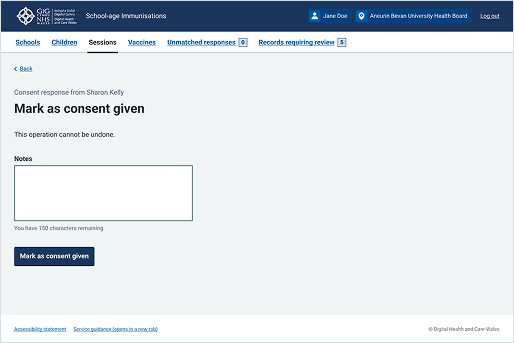
This example is from the School-age Immunisations service within WIS. It shows the textarea allowing a maximum 150 characters for a clinical service.