Radios
Updated in October 2026
Use radios when you want users to select only 1 option from a list.
<fieldset class="nhsw-fieldset" aria-describedby="contact-hint">
  <legend class="nhsw-fieldset__legend nhsw-h2">How do you want to be contacted about this?</legend>
  <div class="nhsw-hint" id="contact-hint">Select 1 option</div>
  <div class="nhsw-radios">
    <div class="nhsw-radios__item">
      <input class="nhsw-radios__input" id="contact-1" name="contact" type="radio" value="email">
      <label class="nhsw-label nhsw-radios__label" for="contact-1">Email</label>
    </div>
  </div>
</fieldset>
{% from "radios/macro.njk" import nhswRadios %}
{{ nhswRadios({
name: "contact",
fieldset: { legend: { text: "How do you want to be contacted about this?" } },
hint: { text: "Select 1 option" },
items: [
{ text: "Email", value: "email" }
]
}) }}When to use radios
Use radios when you want users to select only 1 option from a list.
This component is used interchangeably across devices.
When not to use radios
Do not use radios if users might need to select more than 1 option. Use checkboxes instead.
How to use radios
Position radios to the left of their labels. This makes them easier to find, especially for users of screen magnifiers.
Unlike with checkboxes, users can only select 1 option from a list of radios. Do not assume that users will know how many options they can select based on the visual difference between radios and checkboxes alone. If needed, add a hint explaining this, for example, "Select 1 option".
Do not pre-select radio options as this makes it more likely that users will:
- not realise they've missed a question
- submit the wrong answer
Users cannot clear a selection once they have chosen an option. To allow users to change their answer, include an option such as "None of these" or "I do not know" where appropriate. Avoid using a simple yes/no choice unless there are only 2 valid answers.
Order radio options alphabetically by default. In some cases, it's helpful to order them from most-to-least common options, for example, by population size. But be careful, as this can reinforce bias. If in doubt, order alphabetically.
Group radios together in a <fieldset> with a <legend> that describes them. You can see an example at the top of this page. This is usually a question, like "Are you 18 or over?".
Error messages
Display an error message if the user has not:
- selected any radios
- answered a conditionally revealed question
Style error messages like this.
<div class="nhsw-form-group nhsw-form-group--error">
  <fieldset class="nhsw-fieldset" aria-describedby="name-hint name-error">
    <legend class="nhsw-fieldset__legend nhsw-h2">Have you changed your name?</legend>
    <div class="nhsw-hint" id="name-hint">This includes changing your last name or spelling your name differently</div>
    <p class="nhsw-error-message" id="name-error"><span class="nhsw-visually-hidden">Error: </span>Select yes if you have changed your name</p>
    <div class="nhsw-radios">
      <div class="nhsw-radios__item">
        <input class="nhsw-radios__input" id="name-yes" name="name" type="radio" value="yes" aria-invalid="true">
        <label class="nhsw-label nhsw-radios__label" for="name-yes">Yes</label>
      </div>
      <div class="nhsw-radios__item">
        <input class="nhsw-radios__input" id="name-no" name="name" type="radio" value="no" aria-invalid="true">
        <label class="nhsw-label nhsw-radios__label" for="name-no">No</label>
      </div>
    </div>
  </fieldset>
</div>
{% from "radios/macro.njk" import nhswRadios %}
{{ nhswRadios({
name: "name",
fieldset: { legend: { text: "Have you changed your name?" } },
hint: { text: "This includes changing your last name or spelling your name differently" },
errorMessage: { text: "Select yes if you have changed your name" },
items: [
{ text: "Yes", value: "yes", id: "name-yes" },
{ text: "No", value: "no", id: "name-no" }
]
}) }}Follow:
- NHS England Design System guidance on error messages
- GOV.UK Design System guidance on error messages for radios
Accessibility
Group radios together in a <fieldset> with a <legend> that describes them. You can see an example at the top of this page. This is usually a question, like "Are you 18 or over?". This supports WCAG Success Criterion 1.3.1 Info and Relationships, level A.
Users should not be expected to infer that only 1 option can be selected. GOV.UK recommends hint text such as "Select 1 option" where necessary. This supports WCAG Success Criterion 3.3.2 Labels or Instructions, level A.
Position radios to the left of their labels. This makes them easier to find, especially for users of screen magnifiers. This supports WCAG Success Criterion 1.4.10 Reflow, level AA.
Source
Learn more about Radios in the GOV.UK Design System.
Radios variants
Inline radios
<div class="nhsw-form-group">
  <fieldset class="nhsw-fieldset">
    <legend class="nhsw-fieldset__legend nhsw-h2">Are you 18 or over?</legend>
    <div class="nhsw-radios nhsw-radios--inline">
      <div class="nhsw-radios__item">
        <input class="nhsw-radios__input" id="over18-yes" name="over18" type="radio" value="yes">
        <label class="nhsw-label nhsw-radios__label" for="over18-yes">Yes</label>
      </div>
      <div class="nhsw-radios__item">
        <input class="nhsw-radios__input" id="over18-no" name="over18" type="radio" value="no">
        <label class="nhsw-label nhsw-radios__label" for="over18-no">No</label>
      </div>
    </div>
  </fieldset>
</div>
{{ nhswRadios({
name: "over18",
fieldset: { legend: { text: "Are you 18 or over?" } },
classes: "nhsw-radios--inline",
items: [
{ text: "Yes", value: "yes", id: "over18-yes" },
{ text: "No", value: "no", id: "over18-no" }
]
}) }}When to use inline radios
If there are only 2 short options, you can either stack the radios vertically or display them horizontally (inline).
On small screens such as mobile devices, the radios will still stack vertically.
Radios with hints
<fieldset class="nhsw-fieldset" aria-describedby="contact-hint">
  <legend class="nhsw-fieldset__legend nhsw-h2">How do you want to be contacted about this?</legend>
  <div class="nhsw-hint" id="contact-hint">Select 1 option</div>
  <div class="nhsw-radios">
    <div class="nhsw-radios__item">
      <input class="nhsw-radios__input" id="contact-1" name="contact" type="radio" value="email">
      <label class="nhsw-label nhsw-radios__label" for="contact-1">Email</label>
    </div>
    <div class="nhsw-radios__item">
      <input class="nhsw-radios__input" id="contact-2" name="contact" type="radio" value="phone">
      <label class="nhsw-label nhsw-radios__label" for="contact-2">Phone</label>
    </div>
    <div class="nhsw-radios__item">
      <input class="nhsw-radios__input" id="contact-3" name="contact" type="radio" value="text">
      <label class="nhsw-label nhsw-radios__label" for="contact-3">Text message</label>
    </div>
  </div>
</fieldset>
{% from "radios/macro.njk" import nhswRadios %}
{{ nhswRadios({
name: "contact",
fieldset: { legend: { text: "How do you want to be contacted about this?" } },
hint: { text: "Select 1 option" },
items: [
{ text: "Email", value: "email", id: "contact-1" },
{ text: "Phone", value: "phone", id: "contact-2" },
{ text: "Text message", value: "text", id: "contact-3" }
]
}) }}When to use radios with hints
Use hint text to give users help in context. Read more about hint text in the NHS England Design System.
Do not assume that users will know that they can only select 1 option based on the visual difference between radios and checkboxes. If needed, add a hint explaining this, for example, "Select 1 option".
Radio items with hints
<fieldset class="nhsw-fieldset">
  <legend class="nhsw-fieldset__legend nhsw-h2">Do you have a mobile phone with signal?</legend>
  <div class="nhsw-radios">
    <div class="nhsw-radios__item">
      <input class="nhsw-radios__input" id="mobile-yes" name="mobile" type="radio" value="yes" aria-describedby="mobile-yes-hint">
      <label class="nhsw-label nhsw-radios__label" for="mobile-yes">Yes, I have a mobile phone with signal</label>
      <div class="nhsw-hint nhsw-radios__hint" id="mobile-yes-hint">We will text you a 6 digit security code</div>
    </div>
    <div class="nhsw-radios__item">
      <input class="nhsw-radios__input" id="mobile-no" name="mobile" type="radio" value="no" aria-describedby="mobile-no-hint">
      <label class="nhsw-label nhsw-radios__label" for="mobile-no">No, I want to use my landline</label>
      <div class="nhsw-hint nhsw-radios__hint" id="mobile-no-hint">We will call you to give you a 6 digit security code</div>
    </div>
  </div>
</fieldset>
{% from "radios/macro.njk" import nhswRadios %}
{{ nhswRadios({
name: "mobile",
fieldset: { legend: { text: "Do you have a mobile phone with signal?" } },
items: [
{ text: "Yes, I have a mobile phone with signal", value: "yes", id: "mobile-yes", hint: { text: "We will text you a 6 digit security code" } },
{ text: "No, I want to use my landline", value: "no", id: "mobile-no", hint: { text: "We will call you to give you a 6 digit security code" } }
]
}) }}When to use radio items with hints
You can add hints to radios to give more information about the options.
Radio items with a text divider
<fieldset class="nhsw-fieldset" aria-describedby="vacc-hint">
  <legend class="nhsw-fieldset__legend nhsw-h2">Have you had all the vaccinations you're eligible for in the UK?</legend>
  <div class="nhsw-hint" id="vacc-hint">You would have got these vaccinations at school, from your GP surgery or another healthcare provider</div>
  <div class="nhsw-radios">
    <div class="nhsw-radios__item">
      <input class="nhsw-radios__input" id="vacc-yes" name="vacc" type="radio" value="yes">
      <label class="nhsw-label nhsw-radios__label" for="vacc-yes">Yes</label>
    </div>
    <div class="nhsw-radios__item">
      <input class="nhsw-radios__input" id="vacc-no" name="vacc" type="radio" value="no">
      <label class="nhsw-label nhsw-radios__label" for="vacc-no">No</label>
    </div>
    <div class="nhsw-radios__divider">or</div>
    <div class="nhsw-radios__item">
      <input class="nhsw-radios__input" id="vacc-dontknow" name="vacc" type="radio" value="dont-know">
      <label class="nhsw-label nhsw-radios__label" for="vacc-dontknow">I do not know</label>
    </div>
  </div>
</fieldset>
{% from "radios/macro.njk" import nhswRadios %}
{{ nhswRadios({
name: "vacc",
fieldset: { legend: { text: "Have you had all the vaccinations you're eligible for in the UK?" } },
hint: { text: "You would have got these vaccinations at school, from your GP surgery or another healthcare provider" },
items: [
{ text: "Yes", value: "yes" },
{ text: "No", value: "no" },
{ divider: "or" },
{ text: "I do not know", value: "dont-know" }
]
}) }}When to use radio items with a text divider
If 1 or more of your radio options is different from the others, it can help users if you separate them using a text divider. The text is usually the word "or".
Conditionally revealing a related question
You can add a conditionally revealing question to radios, so users only see the question when it's relevant to them. For example, you could reveal an email address input only when a user chooses to be contacted by email.
<fieldset class="nhsw-fieldset">
  <legend class="nhsw-fieldset__legend nhsw-h2">Is Sam ready for their HPV vaccination?</legend>
  <div class="nhsw-radios">
    <div class="nhsw-radios__item">
      <input class="nhsw-radios__input" id="hpv-ready-yes" name="hpv-ready" type="radio" value="yes">
      <label class="nhsw-label nhsw-radios__label" for="hpv-ready-yes">Yes</label>
    </div>
    <div class="nhsw-radios__item">
      <input class="nhsw-radios__input" id="hpv-ready-no" name="hpv-ready" type="radio" value="no" data-aria-controls="conditional-hpv-ready-no">
      <label class="nhsw-label nhsw-radios__label" for="hpv-ready-no">No</label>
    </div>
    <div class="nhsw-radios__conditional" id="conditional-hpv-ready-no">
      <div class="nhsw-form-group">
        <label class="nhsw-label" for="hpv-ready-reason">Give details</label>
        <textarea class="nhsw-textarea" id="hpv-ready-reason" name="hpv-ready-reason" rows="3" aria-describedby="hpv-ready-reason-count" data-max-length="150" data-max-length-target="hpv-ready-reason-count"></textarea>
        <div class="nhsw-hint nhsw-textarea__count" id="hpv-ready-reason-count">You have 150 characters remaining</div>
      </div>
    </div>
  </div>
</fieldset>
{% from "radios/macro.njk" import nhswRadios %}
{{ nhswRadios({
name: "hpv-ready",
fieldset: { legend: { text: "Is Sam ready for their HPV vaccination?" } },
items: [
{ text: "Yes", value: "yes" },
{
text: "No",
value: "no",
id: "hpv-ready-no",
conditional: {
html: "<div class=\"nhsw-form-group\"><label class=\"nhsw-label\" for=\"hpv-ready-reason\">Give details</label><textarea class=\"nhsw-textarea\" id=\"hpv-ready-reason\" name=\"hpv-ready-reason\" rows=\"3\" aria-describedby=\"hpv-ready-reason-count\" data-max-length=\"150\" data-max-length-target=\"hpv-ready-reason-count\"></textarea><div class=\"nhsw-hint nhsw-textarea__count\" id=\"hpv-ready-reason-count\">You have 150 characters remaining</div></div>"
}
}
]
}) }}Keep it simple. If you need to add a lot of content, consider showing it on the next page in the process instead.
Only conditionally reveal questions. Do not show or hide anything that is not a question.
Known issues
Users are not always notified when a conditionally revealed question is shown or hidden. This fails WCAG 2.2 success criterion 4.1.2 name, role, value (W3C).
However, GOV.UK found that screen reader users did not have difficulty answering a conditionally revealed question as long as its simple. It confused users when they conditionally revealed complicated questions, particularly questions with more than 1 part.
Smaller radios
<fieldset class="nhsw-fieldset">
  <legend class="nhsw-fieldset__legend nhsw-h2">Filter</legend>
  <div class="nhsw-radios nhsw-radios--small">
    <div class="nhsw-radios__item">
      <input class="nhsw-radios__input" id="filter-monthly" name="filter" type="radio" value="monthly">
      <label class="nhsw-label nhsw-radios__label" for="filter-monthly">Monthly</label>
    </div>
    <div class="nhsw-radios__item">
      <input class="nhsw-radios__input" id="filter-yearly" name="filter" type="radio" value="yearly">
      <label class="nhsw-label nhsw-radios__label" for="filter-yearly">Yearly</label>
    </div>
  </div>
</fieldset>
{{ nhswRadios({
name: "filter",
fieldset: { legend: { text: "Filter" } },
classes: "nhsw-radios--small",
items: [
{ text: "Monthly", value: "monthly", id: "filter-monthly" },
{ text: "Yearly", value: "yearly", id: "filter-yearly" }
]
}) }}When to use smaller radios
You should use standard-sized radios in most cases.
Use small radios where you need something to be less visually prominent. For example, on:
- a page of search results where users need to see and change search filters without distracting them from the results
- information-dense screens in services designed for repeat use, like staff-facing systems
Examples
Welsh Immunisation System (WIS)
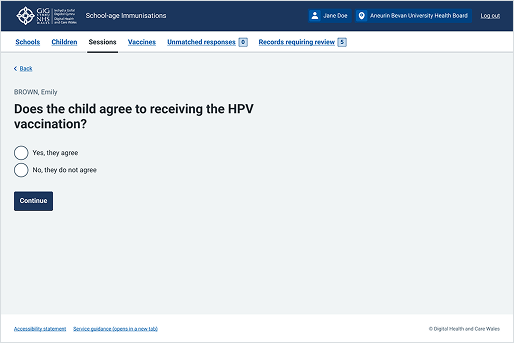
This example is from the School-age Immunisations service within WIS. It shows a basic set of radio buttons where users select 1 option. The options are mutually exclusive, allowing users to answer a single question before continuing.
Choose Pharmacy
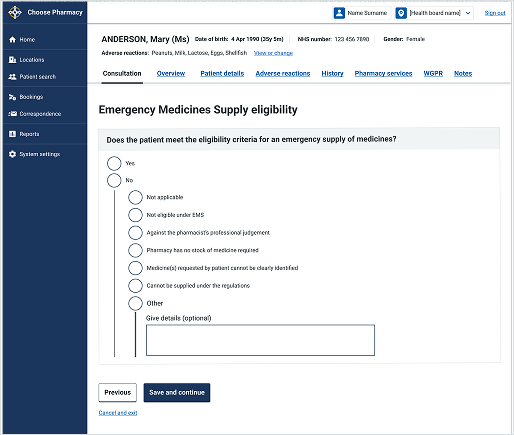
This example is from the Choose Pharmacy service. It shows radio buttons with conditionally revealed content. When the user selects "No", additional options appear to help them give more detail. This keeps the initial question simple while allowing users to provide more information when needed.