Details
Updated in October 2026
Make a page easier to scan by letting users reveal more detailed information only if they need it.
How to find your NHS number
An NHS number is a 10 digit number, like 485 777 3456.
You can find your NHS number by logging in to a GP surgery online service or on any letter the NHS has sent you.
<details class="nhsw-details">
  <summary class="nhsw-details__summary">
    <span class="nhsw-details__summary-text">How to find your NHS number</span>
  </summary>
  <div class="nhsw-details__text">
    <p class="nhsw-body">An NHS number is a 10 digit number, like 485 777 3456.</p>
    <p class="nhsw-body">You can find your NHS number by logging in to a GP surgery online service or on any letter the NHS has sent you.</p>
  </div>
</details>
{% from "details/macro.njk" import nhswDetails %}
{{ nhswDetails({
summaryText: "How to find your NHS number",
html: "<p class=\"nhsw-body\">An NHS number is a 10 digit number, like 485 777 3456.</p><p class=\"nhsw-body\">You can find your NHS number by logging in to a GP surgery online service or on any letter the NHS has sent you.</p>"
}) }}When to use details
The details component is a short link that expands to show more text when a user clicks on it.
Use the component to make a page easier to scan when it contains information that only some users will need.
There are 2 ways to let users reveal more information:
- details
- expander
When not to use details
Do not use details to hide information that most users will need.
How to use details
Make the link text short and descriptive so users can quickly work out if they need to click on it.
Details and expanders
Both the details and expander components hide content that users can choose to reveal.
The details component is less visually prominent and is best suited to supplementary information. Use an expander when the content is more important or likely to be needed.
Avoid using the details component in forms. Users may be reluctant to click on it, which could cause them to miss information needed to complete their task.
Accessibility
Make sure all users can see the details. The background colour must have a contrast ratio of at least 4.5:1 with white to meet WCAG 2.2 Success Criterion 1.4.3 Contrast (Minimum), level AA.
Use descriptive summary link text that clearly sets expectations about the hidden content. Avoid vague phrases such as "More information" or "Read more". Instead, use specific text like "How to find your NHS number" so users can understand where the link will take them. This supports WCAG 2.2 Success Criterion 2.4.4 Link Purpose (In Context), level A.
Source
Learn more about Details in the GOV.UK Design System.
Details variants
There are no variants available for this component.
Contact the DHCW Design System team if the existing component does not meet your requirements. Your feedback helps us understand gaps and prioritise future improvements.
If you adapt the component to meet a specific user need, share your findings with us to help build shared knowledge and support others using it.
Examples
Welsh Immunisation System (WIS)
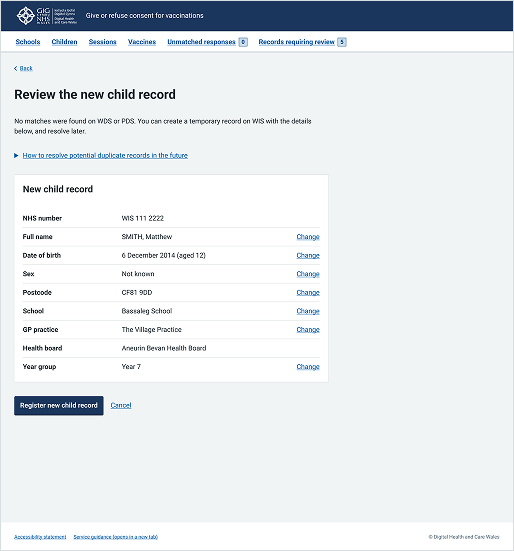
This example shows a page from the School-age Immunisations service where an administrator is reviewing a new child record before final submission. It uses the details component under the introductory text ("How to resolve potential duplicate records in the future") to allow the user to reveal more information if they need it without overloading the page with content.
Choose Pharmacy
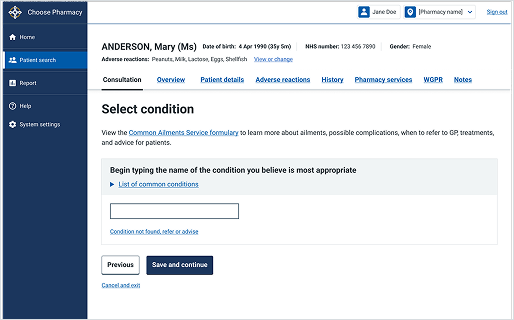
This example shows a "Select condition" page from a consultation journey within the Choose Pharmacy service. It uses the details component under the primary text field ("List of common conditions") to provide secondary guidance for clinicians.