Error summary
Updated in October 2026
Include an error summary at the top of a page to help users identify and fix mistakes they've made.
Your details
<div class="nhsw-error-summary" aria-labelledby="error-summary-title" role="alert" tabindex="-1" data-module="nhsw-error-summary">
  <h2 class="nhsw-h3 nhsw-error-summary__title" id="error-summary-title">There is a problem</h2>
  <p class="nhsw-body">Optional description of the errors and how to correct them</p>
  <ul class="nhsw-error-summary__list">
    <li><a class="nhsw-link nhsw-error-summary__link" href="#full-name">Enter your full name</a></li>
  </ul>
</div>

<h2 class="nhsw-h2">Your details</h2>
<div class="nhsw-form-group nhsw-form-group--error">
  <label class="nhsw-label" for="full-name">Full name</label>
  <p class="nhsw-error-message" id="full-name-error"><span class="nhsw-visually-hidden">Error: </span>Enter your full name</p>
  <input class="nhsw-input" id="full-name" name="full-name" type="text" aria-describedby="full-name-error" aria-invalid="true">
</div>
{% from "error-summary/macro.njk" import nhswErrorSummary %}
{% from "input/macro.njk" import nhswInput %}
{{ nhswErrorSummary({
titleText: "There is a problem",
descriptionText: "Optional description of the errors and how to correct them",
errorList: [
{ text: "Enter your full name", href: "#full-name" }
]
}) }}
<h2 class="nhsw-h2">Your details</h2>
{{ nhswInput({
id: "full-name",
label: { text: "Full name" },
errorMessage: { text: "Enter your full name" }
}) }}When to use an error summary
Include an error summary at the top of a page to summarise any mistakes a user has made.
When a user makes a mistake, you must show an error summary at the top of the page as well as an error message next to each answer that contains an error.
Always show an error summary when there is a validation error, even if there's only 1 mistake.
How to use an error summary
You must:
- add "Error: " to the beginning of the
<title>so screen readers read it out as soon as possible - show an error summary at the top of a page
- move the keyboard focus to the error summary (
nhsw-behaviours.jsdoes this for you when the summary hasdata-module="nhsw-error-summary", which the macro adds) - include the heading "There is a problem"
- link to each of the answers that have validation errors
- show the same error messages next to the inputs with errors
Follow GOV.UK Design System guidance on writing good error messages.
Linking from the error summary to each answer
You must link the errors in the error summary to the answer they relate to.
For questions that require a user to answer using a single field, like a select, textarea or text input, link to the field.
When a user has to enter their answer into multiple fields, such as the day, month and year fields in the date input component, link to the 1st field that contains an error.
There is a problem
Optional description of the errors and how to correct them
<div class="nhsw-error-summary" aria-labelledby="error-summary-title-date" role="alert" tabindex="-1" data-module="nhsw-error-summary">
  <h2 class="nhsw-h3 nhsw-error-summary__title" id="error-summary-title-date">There is a problem</h2>
  <p class="nhsw-body">Optional description of the errors and how to correct them</p>
  <ul class="nhsw-error-summary__list">
    <li><a class="nhsw-link nhsw-error-summary__link" href="#dob-year">Date of birth must include a year</a></li>
  </ul>
</div>

<div class="nhsw-form-group nhsw-form-group--error">
  <fieldset class="nhsw-fieldset" role="group" aria-describedby="dob-hint dob-error">
    <legend class="nhsw-fieldset__legend nhsw-h2">What is your date of birth?</legend>
    <div class="nhsw-hint" id="dob-hint">For example, 15 3 1984</div>
    <p class="nhsw-error-message" id="dob-error"><span class="nhsw-visually-hidden">Error: </span>The date of birth must include a year</p>
    <div class="nhsw-date-input">
      <div class="nhsw-date-input__item">
        <label class="nhsw-label nhsw-date-input__label" for="dob-day">Day</label>
        <input id="dob-day" name="dob-day" class="nhsw-input nhsw-date-input__input nhsw-date-input__input--day" type="text" inputmode="numeric" maxlength="2" value="1">
      </div>
      <div class="nhsw-date-input__item">
        <label class="nhsw-label nhsw-date-input__label" for="dob-month">Month</label>
        <input id="dob-month" name="dob-month" class="nhsw-input nhsw-date-input__input nhsw-date-input__input--month" type="text" inputmode="numeric" maxlength="2" value="12">
      </div>
      <div class="nhsw-date-input__item">
        <label class="nhsw-label nhsw-date-input__label" for="dob-year">Year</label>
        <input id="dob-year" name="dob-year" class="nhsw-input nhsw-date-input__input nhsw-date-input__input--year" type="text" inputmode="numeric" maxlength="4" aria-invalid="true">
      </div>
    </div>
  </fieldset>
</div>
{% from "date-input/macro.njk" import nhswDateInput %}
{{ nhswErrorSummary({
titleText: "There is a problem",
descriptionText: "Optional description of the errors and how to correct them",
errorList: [
{ text: "Date of birth must include a year", href: "#dob-year" }
]
}) }}
{{ nhswDateInput({
id: "dob",
fieldset: { legend: { text: "What is your date of birth?" } },
hint: { text: "For example, 15 3 1984" },
errorMessage: { text: "The date of birth must include a year" },
errorFields: ["year"],
values: { day: "1", month: "12" }
}) }}If you do not know which field contains an error
If you do not know which field contains an error, link to the 1st field.
For questions that require a user to select 1 or more options from a list using radios or checkboxes, link to the 1st radio or checkbox.
There is a problem
Optional description of the errors and how to correct them
<div class="nhsw-error-summary" aria-labelledby="error-summary-title-checkboxes" role="alert" tabindex="-1" data-module="nhsw-error-summary">
  <h2 class="nhsw-h3 nhsw-error-summary__title" id="error-summary-title-checkboxes">There is a problem</h2>
  <p class="nhsw-body">Optional description of the errors and how to correct them</p>
  <ul class="nhsw-error-summary__list">
    <li><a class="nhsw-link nhsw-error-summary__link" href="#contact-1">Select how you want to be contacted</a></li>
  </ul>
</div>

<div class="nhsw-form-group nhsw-form-group--error">
  <fieldset class="nhsw-fieldset" aria-describedby="contact-hint contact-error">
    <legend class="nhsw-fieldset__legend nhsw-h2">How do you want to be contacted about this?</legend>
    <div class="nhsw-hint" id="contact-hint">Select all options that are relevant to you</div>
    <p class="nhsw-error-message" id="contact-error"><span class="nhsw-visually-hidden">Error: </span>Select how you want to be contacted</p>
    <div class="nhsw-checkboxes">
      <div class="nhsw-checkboxes__item">
        <input class="nhsw-checkboxes__input" id="contact-1" name="contact" type="checkbox" value="email">
        <label class="nhsw-label nhsw-checkboxes__label" for="contact-1">Email</label>
      </div>
      <div class="nhsw-checkboxes__item">
        <input class="nhsw-checkboxes__input" id="contact-2" name="contact" type="checkbox" value="phone">
        <label class="nhsw-label nhsw-checkboxes__label" for="contact-2">Phone</label>
      </div>
      <div class="nhsw-checkboxes__item">
        <input class="nhsw-checkboxes__input" id="contact-3" name="contact" type="checkbox" value="text">
        <label class="nhsw-label nhsw-checkboxes__label" for="contact-3">Text message</label>
      </div>
    </div>
  </fieldset>
</div>
{% from "checkboxes/macro.njk" import nhswCheckboxes %}
{{ nhswErrorSummary({
titleText: "There is a problem",
descriptionText: "Optional description of the errors and how to correct them",
errorList: [
{ text: "Select how you want to be contacted", href: "#contact-1" }
]
}) }}
{{ nhswCheckboxes({
name: "contact",
fieldset: { legend: { text: "How do you want to be contacted about this?" } },
hint: { text: "Select all options that are relevant to you" },
errorMessage: { text: "Select how you want to be contacted" },
items: [
{ text: "Email", value: "email" },
{ text: "Phone", value: "phone" },
{ text: "Text message", value: "text" }
]
}) }}Where to put the error summary
Put the error summary at the top of the main container. If your page includes breadcrumbs or a back link, place it below these, but above the <h1>.
There is a problem
Optional description of the errors and how to correct them
Your details
<div class="nhsw-error-summary" aria-labelledby="error-summary-title-timeout" role="alert" tabindex="-1" data-module="nhsw-error-summary">
  <h2 class="nhsw-h3 nhsw-error-summary__title" id="error-summary-title-timeout">There is a problem</h2>
  <p class="nhsw-body">Optional description of the errors and how to correct them</p>
  <ul class="nhsw-error-summary__list">
    <li><a class="nhsw-link nhsw-error-summary__link" href="#full-name-timeout">Your login attempt timed out. Login will start from the beginning.</a></li>
  </ul>
</div>

<h2 class="nhsw-h2">Your details</h2>
<div class="nhsw-form-group nhsw-form-group--error">
  <label class="nhsw-label" for="full-name-timeout">Full name</label>
  <p class="nhsw-error-message" id="full-name-timeout-error"><span class="nhsw-visually-hidden">Error: </span>Enter your full name</p>
  <input class="nhsw-input" id="full-name-timeout" name="full-name" type="text" aria-describedby="full-name-timeout-error" aria-invalid="true">
</div>
{{ nhswErrorSummary({
titleText: "There is a problem",
descriptionText: "Optional description of the errors and how to correct them",
errorList: [
{ text: "Your login attempt timed out. Login will start from the beginning.", href: "#full-name-timeout" }
]
}) }}
<h2 class="nhsw-h2">Your details</h2>
{{ nhswInput({
id: "full-name-timeout",
label: { text: "Full name" },
errorMessage: { text: "Enter your full name" }
}) }}Accessibility
Do not clear form fields when showing validation errors. Keep the information the user has already entered so they can correct mistakes without having to re-enter data. This helps reduce efforts and supports WCAG 2.2 Success Criterion 3.3.7 Redundant Entry, level A.
Move keyboard focus to the error summary when a form contains errors. This makes sure that screen reader and keyboard users are immediately notified of errors and can understand what needs to be corrected. This supports WCAG 2.2 Success Criterion 3.3.1 Error Identification, level A.
Link error summary messages to the relevant form fields. Users should be able to select an error in the summary and be taken directly to the corresponding form field's id attribute to meet WCAG 2.2 Success Criterion 2.4.3 Focus Order, level A.
Source
Learn more about Error summaries in the GOV.UK Design System.
Error summary variants
There are no variants available for this component.
Contact the DHCW Design System team if the existing component does not meet your requirements. Your feedback helps us understand gaps and prioritise future improvements.
If you adapt the component to meet a specific user need, share your findings with us to help build shared knowledge and support others using it.
Examples
Welsh Immunisation System (WIS)
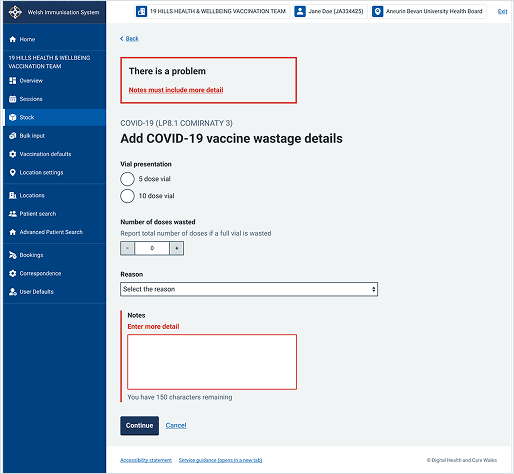
This example shows the "Add COVID-19 vaccine wastage details" screen within WIS. It uses an error summary component at the top of the main content area to immediately highlight where there has been an input error.
Welsh Immunisation System (WIS)
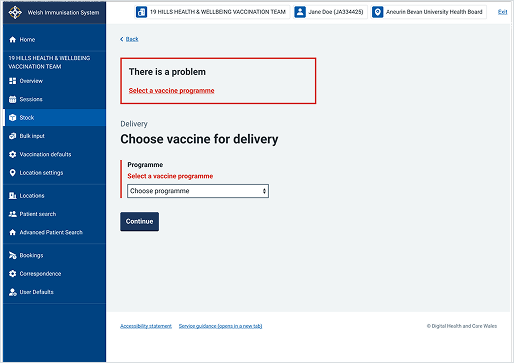
This example shows the "Choose vaccine for delivery" screen within WIS. It uses an error summary component at the top of the page to highlight form validation errors clearly.