Date input
Updated in October 2026
Use date input to help users enter a memorable date, like their date of birth.
<fieldset class="nhsw-fieldset" role="group" aria-describedby="dob-hint">
  <legend class="nhsw-fieldset__legend nhsw-h2">What is your date of birth?</legend>
  <div class="nhsw-hint" id="dob-hint">For example, 15 3 1984</div>
  <div class="nhsw-date-input">
    <div class="nhsw-date-input__item">
      <label class="nhsw-label nhsw-date-input__label" for="dob-day">Day</label>
      <input id="dob-day" name="dob-day" class="nhsw-input nhsw-date-input__input nhsw-date-input__input--day" type="text" inputmode="numeric" maxlength="2" autocomplete="bday-day">
    </div>
    <div class="nhsw-date-input__item">
      <label class="nhsw-label nhsw-date-input__label" for="dob-month">Month</label>
      <input id="dob-month" name="dob-month" class="nhsw-input nhsw-date-input__input nhsw-date-input__input--month" type="text" inputmode="numeric" maxlength="2" autocomplete="bday-month">
    </div>
    <div class="nhsw-date-input__item">
      <label class="nhsw-label nhsw-date-input__label" for="dob-year">Year</label>
      <input id="dob-year" name="dob-year" class="nhsw-input nhsw-date-input__input nhsw-date-input__input--year" type="text" inputmode="numeric" maxlength="4" autocomplete="bday-year">
    </div>
  </div>
</fieldset>
{% from "date-input/macro.njk" import nhswDateInput %}
{{ nhswDateInput({
id: "dob",
namePrefix: "dob",
fieldset: { legend: { text: "What is your date of birth?", classes: "nhsw-h2" } },
hint: { text: "For example, 15 3 1984" }
}) }}When to use date input
Use date input when users are likely to know the exact date, for example their date of birth.
When not to use date input
Do not use date input if users are unlikely to know the exact date you're asking about.
How to use date input
Date input consists of 3 fields to let users enter a day, month and year.
Group the fields together in a <fieldset> and use a <legend> to describe them. The legend is usually a question, like "What is your date of birth?".
If you're asking 1 question per page, you can set the contents of the <legend> as the page heading. This is good practice as it means that screen reader users do not hear the same information twice.
Never automatically move users between the day, month and year fields. This can be confusing and interfere with keyboard navigation.
Read more on the GOV.UK Design System about making labels and legends headings.
If you're asking more than 1 question on the page
If you're asking more than 1 question on the page, do not set the contents of the <legend> as the page heading. Read more on the GOV.UK Design System about asking multiple questions on question pages.
Follow GOV.UK guidance on error messages for date inputs.
Use the autocomplete attribute for a date of birth
Use the autocomplete attribute on the date input component when you're asking for a date of birth. This lets browsers autofill the information on a user's behalf if they've entered it previously.
To do this, set the autocomplete attribute on the 3 fields to bday-day, bday-month and bday-year.
Error messages
Error message 1
<div class="nhsw-form-group nhsw-form-group--error">
  <fieldset class="nhsw-fieldset" role="group" aria-describedby="dob-error-hint dob-error-message">
    <legend class="nhsw-fieldset__legend nhsw-h2">What is your date of birth?</legend>
    <div class="nhsw-hint" id="dob-error-hint">For example, 15 3 1984</div>
    <p class="nhsw-error-message" id="dob-error-message"><span class="nhsw-visually-hidden">Error: </span>The date of birth must be in the past</p>
    <div class="nhsw-date-input">
      <div class="nhsw-date-input__item">
        <label class="nhsw-label nhsw-date-input__label" for="dob-error-day">Day</label>
        <input id="dob-error-day" name="dob-error-day" class="nhsw-input nhsw-date-input__input nhsw-date-input__input--day nhsw-is-invalid" type="text" inputmode="numeric" maxlength="2" autocomplete="bday-day" value="1" aria-invalid="true">
      </div>
      <div class="nhsw-date-input__item">
        <label class="nhsw-label nhsw-date-input__label" for="dob-error-month">Month</label>
        <input id="dob-error-month" name="dob-error-month" class="nhsw-input nhsw-date-input__input nhsw-date-input__input--month nhsw-is-invalid" type="text" inputmode="numeric" maxlength="2" autocomplete="bday-month" value="12" aria-invalid="true">
      </div>
      <div class="nhsw-date-input__item">
        <label class="nhsw-label nhsw-date-input__label" for="dob-error-year">Year</label>
        <input id="dob-error-year" name="dob-error-year" class="nhsw-input nhsw-date-input__input nhsw-date-input__input--year nhsw-is-invalid" type="text" inputmode="numeric" maxlength="4" autocomplete="bday-year" value="2000" aria-invalid="true">
      </div>
    </div>
  </fieldset>
</div>
{% from "date-input/macro.njk" import nhswDateInput %}
{{ nhswDateInput({
id: "dob-error",
namePrefix: "dob-error",
fieldset: { legend: { text: "What is your date of birth?", classes: "nhsw-h2" } },
hint: { text: "For example, 15 3 1984" },
errorMessage: { text: "The date of birth must be in the past" },
values: { day: "1", month: "12", year: "2000" }
}) }}Use this error message when a user has entered a date, but the date does not meet the validation rules.
Error message 2
<div class="nhsw-form-group nhsw-form-group--error">
  <fieldset class="nhsw-fieldset" role="group" aria-describedby="dob-year-error-hint dob-year-error-message">
    <legend class="nhsw-fieldset__legend nhsw-h2">What is your date of birth?</legend>
    <div class="nhsw-hint" id="dob-year-error-hint">For example, 15 3 1984</div>
    <p class="nhsw-error-message" id="dob-year-error-message"><span class="nhsw-visually-hidden">Error: </span>The date of birth must include a year</p>
    <div class="nhsw-date-input">
      <div class="nhsw-date-input__item">
        <label class="nhsw-label nhsw-date-input__label" for="dob-year-error-day">Day</label>
        <input id="dob-year-error-day" name="dob-year-error-day" class="nhsw-input nhsw-date-input__input nhsw-date-input__input--day" type="text" inputmode="numeric" maxlength="2" autocomplete="bday-day" value="1">
      </div>
      <div class="nhsw-date-input__item">
        <label class="nhsw-label nhsw-date-input__label" for="dob-year-error-month">Month</label>
        <input id="dob-year-error-month" name="dob-year-error-month" class="nhsw-input nhsw-date-input__input nhsw-date-input__input--month" type="text" inputmode="numeric" maxlength="2" autocomplete="bday-month" value="12">
      </div>
      <div class="nhsw-date-input__item">
        <label class="nhsw-label nhsw-date-input__label" for="dob-year-error-year">Year</label>
        <input id="dob-year-error-year" name="dob-year-error-year" class="nhsw-input nhsw-date-input__input nhsw-date-input__input--year nhsw-is-invalid" type="text" inputmode="numeric" maxlength="4" autocomplete="bday-year" aria-invalid="true">
      </div>
    </div>
  </fieldset>
</div>
{% from "date-input/macro.njk" import nhswDateInput %}
{{ nhswDateInput({
id: "dob-year-error",
namePrefix: "dob-year-error",
fieldset: { legend: { text: "What is your date of birth?", classes: "nhsw-h2" } },
hint: { text: "For example, 15 3 1984" },
errorMessage: { text: "The date of birth must include a year" },
errorFields: ["year"],
values: { day: "1", month: "12" }
}) }}Use this error message when a user has not entered all parts of the date. The message should tell the user which part is missing.
Accessibility
When implemented in production, fields should identify their purpose so browsers and assistive technologies can support features such as autofill and reduce user effort. This is to support WCAG 2.2 Success Criterion 1.3.5 Identify Input Purpose, level AA.
Source
Learn more about Date inputs in the GOV.UK Design System.
Date input variants
There are no variants available for this component.
Contact the DHCW Design System team if the existing component does not meet your requirements. Your feedback helps us understand gaps and prioritise future improvements.
If you adapt the component to meet a specific user need, share your findings with us to help build shared knowledge and support others using it.
Examples
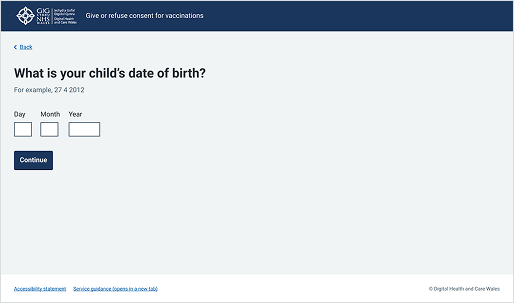
Welsh Immunisation System (WIS)
This example shows a public-facing page from the School-age Immunisations service where a parent or guardian is providing consent. It uses the standard 3 date input to collect a specific, memorable date.
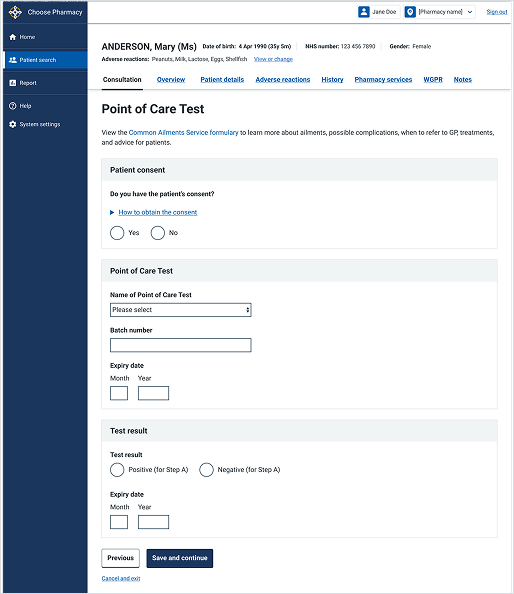
Choose Pharmacy
This example shows a form from a Point of Care Test entry page within the Choose Pharmacy service. It uses input fields for dates, such as the "Expiry date" fields for the test batch and test result, to ensure accurate entry.