Pagination
Updated in October 2026
Use pagination to help users navigate forwards and backwards through a series of pages.
<nav class="nhsw-pagination nhsw-pagination--numbered" role="navigation" aria-label="Pagination">
<a href="/page/9" class="nhsw-pagination__previous" rel="prev">
<svg class="nhsw-pagination__icon" viewBox="0 0 17 15" focusable="false" aria-hidden="true">
<path d="M0.292893 6.65666C-0.0976314 7.04719 -0.0976315 7.68035 0.292892 8.07087L6.65685 14.4348C7.04738 14.8254 7.68054 14.8254 8.07107 14.4348C8.46159 14.0443 8.46159 13.4111 8.07107 13.0206L2.41421 7.36377L8.07107 1.70691C8.46159 1.31639 8.46159 0.683225 8.07107 0.292701C7.68054 -0.0978235 7.04738 -0.0978235 6.65686 0.292701L0.292893 6.65666ZM17 7.36377L17 6.36377L1 6.36377L1 7.36377L1 8.36377L17 8.36377L17 7.36377Z"/>
</svg>
<span class="nhsw-pagination__title">Previous</span>
</a>
<ul class="nhsw-pagination__list">
<li class="nhsw-pagination__item"><a class="nhsw-pagination__number-link" href="/page/1" aria-label="Page 1">1</a></li>
<li class="nhsw-pagination__item nhsw-pagination__item--ellipsis">⋯</li>
<li class="nhsw-pagination__item"><a class="nhsw-pagination__number-link" href="/page/8" aria-label="Page 8">8</a></li>
<li class="nhsw-pagination__item"><a class="nhsw-pagination__number-link" href="/page/9" aria-label="Page 9">9</a></li>
<li class="nhsw-pagination__item nhsw-pagination__item--current"><a class="nhsw-pagination__number-link" href="/page/10" aria-current="page" aria-label="Page 10">10</a></li>
<li class="nhsw-pagination__item"><a class="nhsw-pagination__number-link" href="/page/11" aria-label="Page 11">11</a></li>
<li class="nhsw-pagination__item"><a class="nhsw-pagination__number-link" href="/page/12" aria-label="Page 12">12</a></li>
<li class="nhsw-pagination__item nhsw-pagination__item--ellipsis">⋯</li>
<li class="nhsw-pagination__item"><a class="nhsw-pagination__number-link" href="/page/42" aria-label="Page 42">42</a></li>
</ul>
<a href="/page/11" class="nhsw-pagination__next" rel="next">
<span class="nhsw-pagination__title">Next</span>
<svg class="nhsw-pagination__icon" viewBox="0 0 17 15" focusable="false" aria-hidden="true">
<path d="M16.7071 8.07088C17.0976 7.68035 17.0976 7.04719 16.7071 6.65666L10.3431 0.292703C9.95262 -0.0978218 9.31946 -0.0978219 8.92893 0.292703C8.53841 0.683227 8.53841 1.31639 8.92893 1.70692L14.5858 7.36377L8.92893 13.0206C8.53841 13.4111 8.53841 14.0443 8.92893 14.4348C9.31946 14.8254 9.95262 14.8254 10.3431 14.4348L16.7071 8.07088ZM0 7.36377L-8.74224e-08 8.36377L16 8.36377L16 7.36377L16 6.36377L8.74224e-08 6.36377L0 7.36377Z"/>
</svg>
</a>
</nav>{% from "pagination/macro.njk" import nhswPagination %}
{{ nhswPagination({
variant: "numbered",
previous: { href: "/page/9" },
next: { href: "/page/11" },
items: [
{ number: 1, href: "/page/1" },
{ ellipsis: true },
{ number: 8, href: "/page/8" },
{ number: 9, href: "/page/9" },
{ number: 10, href: "/page/10", current: true },
{ number: 11, href: "/page/11" },
{ number: 12, href: "/page/12" },
{ ellipsis: true },
{ number: 42, href: "/page/42" }
]
}) }}When to use pagination
Use pagination at the bottom of the page to help users navigate forwards and backwards through a series of related pages. For example, pages of search results or information about a health condition that's divided into multiple web pages.
Consider using pagination when:
- displaying all content on 1 page would make it harder for users to scan or find what they need
- most users are likely to find what they need within the first few pages
Use pagination rather than the "infinite scroll" technique which automatically loads content when the user approaches the bottom of the page. This causes problems for keyboard users.
When not to use pagination
Only break up content onto separate pages if it improves the performance or usability of your service.
Do not use pagination on pages which are not grouped together or "related" as this is likely to confuse users.
Do not use pagination to navigate through a multi-page form. We use other components instead, including:
How to use pagination
You should:
- place the pagination component after the content on each paginated page
- not show pagination if there's only 1 page of content
- redirect users to the first page if a requested page is unavailable or no longer exists
Accessibility
The pagination component is wrapped in a <nav> element to show that they are navigation links. It has an <aria-label> attribute with the value Pagination. Screen readers that support this attribute will read this.
A visually hidden heading, Pagination, is also included so screen reader users can identify the purpose of the navigation when navigating by headings.
The link for the current page uses aria-current="page" to indicate the user's current location within the pagination.
This supports WCAG 2.2 Success Criterion 1.3.1 Info and Relationships, level A by ensuring that relationships, structure and state are available to assistive technologies.
Source
Learn more about Pagination in the GOV.UK Design System.
Pagination variants
For navigating between content pages
<nav class="nhsw-pagination" role="navigation" aria-label="Pagination">
  <ul class="nhsw-pagination__list">
    <li class="nhsw-pagination-item--previous">
      <a class="nhsw-pagination__link" href="/treatments">
        <svg class="nhsw-icon" viewBox="0 0 17 15" focusable="false" aria-hidden="true">
          <path d="M0.292893 6.65666C-0.0976314 7.04719 -0.0976315 7.68035 0.292892 8.07087L6.65685 14.4348C7.04738 14.8254 7.68054 14.8254 8.07107 14.4348C8.46159 14.0443 8.46159 13.4111 8.07107 13.0206L2.41421 7.36377L8.07107 1.70691C8.46159 1.31639 8.46159 0.683225 8.07107 0.292701C7.68054 -0.0978235 7.04738 -0.0978235 6.65686 0.292701L0.292893 6.65666ZM17 7.36377L17 6.36377L1 6.36377L1 7.36377L1 8.36377L17 8.36377L17 7.36377Z"/>
        </svg>
        <span class="nhsw-pagination__title">Previous</span>
        <span class="nhsw-pagination__page">Treatments</span>
      </a>
    </li>
    <li class="nhsw-pagination-item--next">
      <a class="nhsw-pagination__link" href="/symptoms">
        <svg class="nhsw-icon" viewBox="0 0 17 15" focusable="false" aria-hidden="true">
          <path d="M16.7071 8.07088C17.0976 7.68035 17.0976 7.04719 16.7071 6.65666L10.3431 0.292703C9.95262 -0.0978218 9.31946 -0.0978219 8.92893 0.292703C8.53841 0.683227 8.53841 1.31639 8.92893 1.70692L14.5858 7.36377L8.92893 13.0206C8.53841 13.4111 8.53841 14.0443 8.92893 14.4348C9.31946 14.8254 9.95262 14.8254 10.3431 14.4348L16.7071 8.07088ZM0 7.36377L-8.74224e-08 8.36377L16 8.36377L16 7.36377L16 6.36377L8.74224e-08 6.36377L0 7.36377Z"/>
        </svg>
        <span class="nhsw-pagination__title">Next</span>
        <span class="nhsw-pagination__page">Symptoms</span>
      </a>
    </li>
  </ul>
</nav>
{{ nhswPagination({
previous: { title: "Previous", label: "Treatments", href: "/treatments" },
next: { title: "Next", label: "Symptoms", href: "/symptoms" }
}) }}Use pagination at the bottom of pages of content to allow users to navigate around a topic that's divided into multiple pages (up to 8 pages).
For navigating between pages of items
<nav class="nhsw-pagination nhsw-pagination--numbered" role="navigation" aria-label="Pagination">
<a href="/page/9" class="nhsw-pagination__previous" rel="prev">
<svg class="nhsw-pagination__icon" viewBox="0 0 17 15" focusable="false" aria-hidden="true">
<path d="M0.292893 6.65666C-0.0976314 7.04719 -0.0976315 7.68035 0.292892 8.07087L6.65685 14.4348C7.04738 14.8254 7.68054 14.8254 8.07107 14.4348C8.46159 14.0443 8.46159 13.4111 8.07107 13.0206L2.41421 7.36377L8.07107 1.70691C8.46159 1.31639 8.46159 0.683225 8.07107 0.292701C7.68054 -0.0978235 7.04738 -0.0978235 6.65686 0.292701L0.292893 6.65666ZM17 7.36377L17 6.36377L1 6.36377L1 7.36377L1 8.36377L17 8.36377L17 7.36377Z"/>
</svg>
<span class="nhsw-pagination__title">Previous</span>
</a>
<ul class="nhsw-pagination__list">
<li class="nhsw-pagination__item"><a class="nhsw-pagination__number-link" href="/page/1" aria-label="Page 1">1</a></li>
<li class="nhsw-pagination__item nhsw-pagination__item--ellipsis">⋯</li>
<li class="nhsw-pagination__item"><a class="nhsw-pagination__number-link" href="/page/8" aria-label="Page 8">8</a></li>
<li class="nhsw-pagination__item"><a class="nhsw-pagination__number-link" href="/page/9" aria-label="Page 9">9</a></li>
<li class="nhsw-pagination__item nhsw-pagination__item--current"><a class="nhsw-pagination__number-link" href="/page/10" aria-current="page" aria-label="Page 10">10</a></li>
<li class="nhsw-pagination__item"><a class="nhsw-pagination__number-link" href="/page/11" aria-label="Page 11">11</a></li>
<li class="nhsw-pagination__item"><a class="nhsw-pagination__number-link" href="/page/12" aria-label="Page 12">12</a></li>
<li class="nhsw-pagination__item nhsw-pagination__item--ellipsis">⋯</li>
<li class="nhsw-pagination__item"><a class="nhsw-pagination__number-link" href="/page/42" aria-label="Page 42">42</a></li>
</ul>
<a href="/page/11" class="nhsw-pagination__next" rel="next">
<span class="nhsw-pagination__title">Next</span>
<svg class="nhsw-pagination__icon" viewBox="0 0 17 15" focusable="false" aria-hidden="true">
<path d="M16.7071 8.07088C17.0976 7.68035 17.0976 7.04719 16.7071 6.65666L10.3431 0.292703C9.95262 -0.0978218 9.31946 -0.0978219 8.92893 0.292703C8.53841 0.683227 8.53841 1.31639 8.92893 1.70692L14.5858 7.36377L8.92893 13.0206C8.53841 13.4111 8.53841 14.0443 8.92893 14.4348C9.31946 14.8254 9.95262 14.8254 10.3431 14.4348L16.7071 8.07088ZM0 7.36377L-8.74224e-08 8.36377L16 8.36377L16 7.36377L16 6.36377L8.74224e-08 6.36377L0 7.36377Z"/>
</svg>
</a>
</nav>{{ nhswPagination({
variant: "numbered",
previous: { href: "/page/9" },
next: { href: "/page/11" },
items: [
{ number: 1, href: "/page/1" },
{ ellipsis: true },
{ number: 8, href: "/page/8" },
{ number: 9, href: "/page/9" },
{ number: 10, href: "/page/10", current: true },
{ number: 11, href: "/page/11" },
{ number: 12, href: "/page/12" },
{ ellipsis: true },
{ number: 42, href: "/page/42" }
]
}) }}Use numbered pagination if users need to navigate through pages of similar items. For example, a list of search results or a list of cases in a case working system.
Decide the maximum number of items to show on each page based on the context of your service and the amount of content for each item.
Show the page number in the page <title> so that screen reader users know they've navigated to a different page. For example, "Search results (page 1 of 4)".
The pagination should always show the page numbers for:
- the current page
- the page before the current page
- the page after the current page
- 1st and last pages
For larger screens, you can show the page numbers for 2 or more pages before and after the current page.
Use ellipses (…) to show gaps in the page numbering. For example:
- [1] 2 … 100
- 1 [2] 3 … 100
- 1 2 [3] 4 … 100
- 1 2 3 [4] 5 … 100
- 1 … 4 [5] 6 … 100
- 1 … 97 [98] 99 100
- 1 … 98 [99] 100
- 1 … 99 [100]
1st and last pages
<nav class="nhsw-pagination nhsw-pagination--numbered" role="navigation" aria-label="Pagination">
  <ul class="nhsw-pagination__list">
    <li class="nhsw-pagination__item nhsw-pagination__item--current"><a class="nhsw-pagination__number-link" href="/page/1" aria-current="page" aria-label="Page 1">1</a></li>
    <li class="nhsw-pagination__item"><a class="nhsw-pagination__number-link" href="/page/2" aria-label="Page 2">2</a></li>
    <li class="nhsw-pagination__item"><a class="nhsw-pagination__number-link" href="/page/3" aria-label="Page 3">3</a></li>
  </ul>
  <a href="/page/2" class="nhsw-pagination__next" rel="next">
    <span class="nhsw-pagination__title">Next</span>
    <svg class="nhsw-pagination__icon" viewBox="0 0 17 15" focusable="false" aria-hidden="true">
      <path d="M16.7071 8.07088C17.0976 7.68035 17.0976 7.04719 16.7071 6.65666L10.3431 0.292703C9.95262 -0.0978218 9.31946 -0.0978219 8.92893 0.292703C8.53841 0.683227 8.53841 1.31639 8.92893 1.70692L14.5858 7.36377L8.92893 13.0206C8.53841 13.4111 8.53841 14.0443 8.92893 14.4348C9.31946 14.8254 9.95262 14.8254 10.3431 14.4348L16.7071 8.07088ZM0 7.36377L-8.74224e-08 8.36377L16 8.36377L16 7.36377L16 6.36377L8.74224e-08 6.36377L0 7.36377Z"/>
    </svg>
  </a>
</nav>
{{ nhswPagination({
variant: "numbered",
next: { href: "/page/2" },
items: [
{ number: 1, href: "/page/1", current: true },
{ number: 2, href: "/page/2" },
{ number: 3, href: "/page/3" }
]
}) }}Do not show a “Previous” link on the first page of a set of results. There is no page before the first page.
<nav class="nhsw-pagination nhsw-pagination--numbered" role="navigation" aria-label="Pagination">
  <a href="/page/2" class="nhsw-pagination__previous" rel="prev">
    <svg class="nhsw-pagination__icon" viewBox="0 0 17 15" focusable="false" aria-hidden="true">
      <path d="M0.292893 6.65666C-0.0976314 7.04719 -0.0976315 7.68035 0.292892 8.07087L6.65685 14.4348C7.04738 14.8254 7.68054 14.8254 8.07107 14.4348C8.46159 14.0443 8.46159 13.4111 8.07107 13.0206L2.41421 7.36377L8.07107 1.70691C8.46159 1.31639 8.46159 0.683225 8.07107 0.292701C7.68054 -0.0978235 7.04738 -0.0978235 6.65686 0.292701L0.292893 6.65666ZM17 7.36377L17 6.36377L1 6.36377L1 7.36377L1 8.36377L17 8.36377L17 7.36377Z"/>
    </svg>
    <span class="nhsw-pagination__title">Previous</span>
  </a>
  <ul class="nhsw-pagination__list">
    <li class="nhsw-pagination__item"><a class="nhsw-pagination__number-link" href="/page/1" aria-label="Page 1">1</a></li>
    <li class="nhsw-pagination__item"><a class="nhsw-pagination__number-link" href="/page/2" aria-label="Page 2">2</a></li>
    <li class="nhsw-pagination__item nhsw-pagination__item--current"><a class="nhsw-pagination__number-link" href="/page/3" aria-current="page" aria-label="Page 3">3</a></li>
  </ul>
</nav>
{{ nhswPagination({
variant: "numbered",
previous: { href: "/page/2" },
items: [
{ number: 1, href: "/page/1" },
{ number: 2, href: "/page/2" },
{ number: 3, href: "/page/3", current: true }
]
}) }}Do not show a “Next” link on the last page of a set of results. There are no more pages after the last page.
Examples
Welsh Immunisation System (WIS)
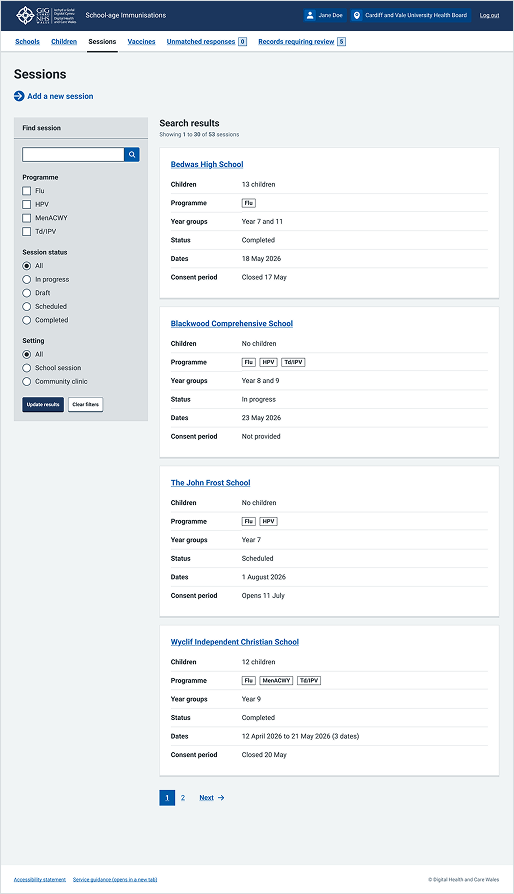
This example shows a search results page within the Sessions section of the School-age Immunisations service within WIS. It uses pagination at the bottom of the page to help users manage large sets of data.