Inset text
Updated in October 2026
Use inset text to help users identify and understand important content on the page, even if they do not read the whole page.
It can take up to 8 weeks to register a lasting power of attorney if there are no mistakes in the application.
<div class="nhsw-inset-text">
  <span class="nhsw-visually-hidden">Information: </span>
  <p class="nhsw-body">It can take up to 8 weeks to register a lasting power of attorney if there are no mistakes in the application.</p>
</div>
{% from "inset-text/macro.njk" import nhswInsetText %}
{{ nhswInsetText({
text: "It can take up to 8 weeks to register a lasting power of attorney if there are no mistakes in the application."
}) }}When to use inset text
Use inset text for content that needs to stand out from the rest of the page.
When not to use inset text
Do not use inset text on transactional pages. We have not yet tested it in this context. If you have a use case you think we should consider adding to the design system, email design.system@wales.nhs.uk.
Some users don't notice inset text on complex pages or near to other prominent elements, so we avoid using it for very important information that users need to see.
Use a warning callout instead if the information:
- is time critical
- could have a significant effect on someone's health
- addresses a common or significant misconception or mistake
How to use inset text
Do not overuse inset text. Only use it when it helps users and place it where they are most likely to need it.
Accessibility
Some users may not be able to identify inset text from surrounding content using visual styling alone.
To help screen reader users understand that the content is different from the main body text, include hidden text like <span class="nhsw-visually-hidden">Information: </span> at the start of the inset text to let users with screen readers know that this is different to the body text. The nhswInsetText Nunjucks macro adds it for you. This supports WCAG 2.2 Success Criterion 1.3.1: Info and Relationships, level A.
Source
Learn more about Inset text in the GOV.UK Design System.
Inset text variants
With heading
Note
It can take up to 8 weeks to register a lasting power of attorney if there are no mistakes in the application.
<div class="nhsw-inset-text">
  <span class="nhsw-visually-hidden">Information: </span>
  <h3 class="nhsw-h3">Note</h3>
  <p class="nhsw-body">It can take up to 8 weeks to register a lasting power of attorney if there are no mistakes in the application.</p>
</div>
{{ nhswInsetText({
html: "<h3 class=\"nhsw-h3\">Note</h3><p class=\"nhsw-body\">It can take up to 8 weeks to register a lasting power of attorney if there are no mistakes in the application.</p>"
}) }}Use a heading if it helps users quickly identify the purpose of the inset text.
Examples
Welsh Immunisation System (WIS)
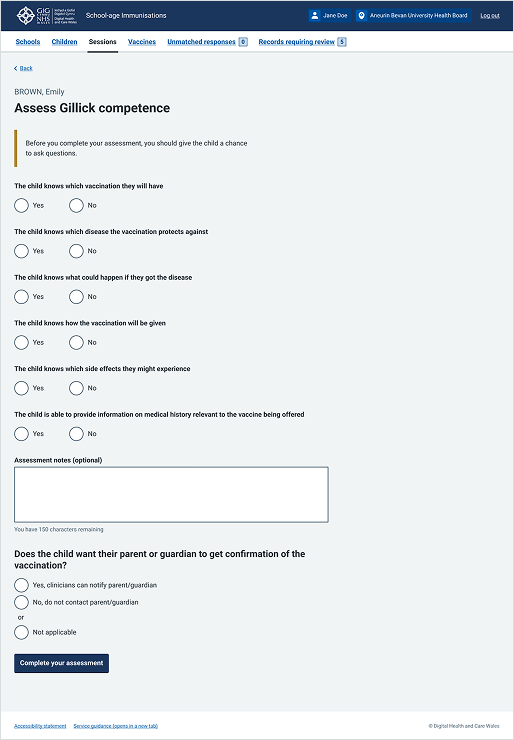
This example shows an assessment page from the School-age Immunisations service within WIS where a clinician evaluates a child's Gillick competence. It uses inset text at the top of the form area to highlight crucial delivery guidance.
Choose Pharmacy
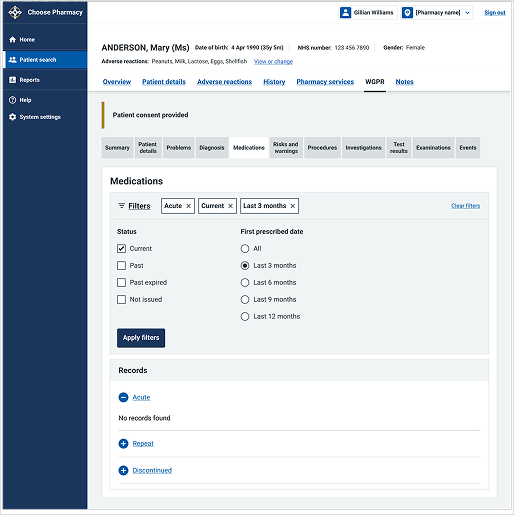
This example shows the "Medications" page within a patient's Welsh GP Record in the Choose Pharmacy service. It uses an inset text component near the top of the content area to highlight key patient status information.