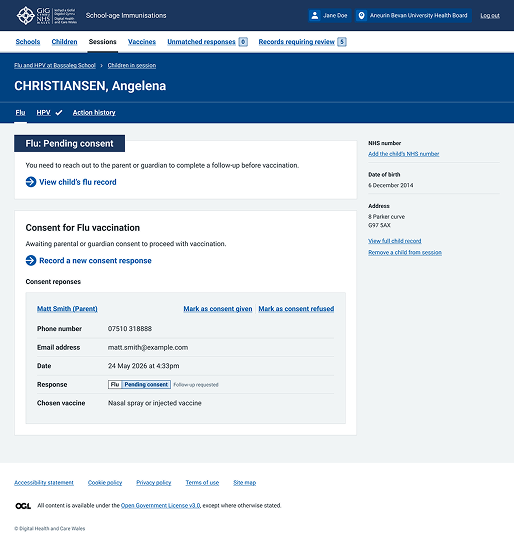
Warning callout
Updated in October 2026
Use a warning callout to help users identify very important content on the page, even if they do not read the whole page.
Important: School, nursery or work
Stay away from school, nursery or work until all the spots have crusted over. This is usually 5 days after the spots first appeared.
<div class="nhsw-warning-callout">
  <h3 class="nhsw-warning-callout__heading">
    <span class="nhsw-warning-callout__icon" aria-hidden="true">!</span>
    <span class="nhsw-warning-callout__heading-text"><span class="nhsw-visually-hidden">Important: </span>School, nursery or work</span>
  </h3>
  <div class="nhsw-warning-callout__content">
    <p class="nhsw-body">Stay away from school, nursery or work until all the spots have crusted over. This is usually 5 days after the spots first appeared.</p>
  </div>
</div>
{% from "warning-callout/macro.njk" import nhswWarningCallout %}
{{ nhswWarningCallout({
heading: "School, nursery or work",
html: "<p class=\"nhsw-body\">Stay away from school, nursery or work until all the spots have crusted over. This is usually 5 days after the spots first appeared.</p>"
}) }}When to use a warning callout
Use this callout for important information that:
- someone needs to be aware of before doing anything else
- is time critical
- could have a significant effect on someone's health
- addresses a common or significant misconception or mistake
When not to use a warning callout
Do not use a warning callout:
- in transactional pages — they have not been tested by either DHCW or NHS England yet
- if the information is not important enough for a warning callout — use inset text or important information
How to use a warning callout
Warning callout content
The callout should have a specific heading, for example "School, nursery or work", prefixed with the visually hidden text Important:. This will help users with screen readers understand that the information is important.
If the heading is simply the word "Important" or it includes the word "important", you do not need to use visually hidden text.
Keep the warning callout short and specific, with no more than 5 lines on mobile view (this is about 2.5 lines on desktop). For example, do not introduce a callout with the words "If this happens...". Explain the circumstances.
Finish sentences in components with a full stop, unless it's a full sentence link.
Warning callout frequency and placement
Avoid using more than 2 warning callouts on a page. Too many warnings can make content harder to scan and may alarm users unnecessarily.
If you need more than 1 warning callout, separate them with a short paragraph of content. Do the same when placing a warning callout near an action link or button.
Do not interrupt the flow of content with a callout. Think about whether you need it and the best place to put it.
Make sure any text below a warning callout has its own heading so that screen reader users know it's not part of the callout.
Accessibility
The heading and background contrast ratio is 11.92:1 and the content and background contrast ratio is 13.69:1. These exceed the requirements of WCAG 2.2 Success Criterion 1.4.3 Contrast (enhanced), level AAA.
Do not rely on colour alone to communicate a warning. Use text and icons to ensure all users can recognise important information. This supports WCAG 2.2 Success Criterion 1.4.1 Use of Colour, level A.
Ensure warning icons and visual indicators have sufficient contrast against surrounding colours. This supports WCAG 2.2 Success Criterion 1.4.11: Non-text Contrast, level AA.
Include hidden text such as "Important" so assistive technologies can identify the content as a warning. You might need to rewrite the hidden text to make it appropriate for your context. This supports WCAG 2.2 Success Criterion 1.3.1: Info and Relationships, level A.
Source
Learn more about Warning callout in the NHS England Design System.
Follow discussions about Warning callout on NHS England GitHub to see the latest updates and resolved issues.
Warning callout variants
Important information
Important information
If you need an interpreter or have accessibility requirements, let us know before your appointment. This helps us make sure the right support is in place when you attend.
<div class="nhsw-warning-callout nhsw-warning-callout--important">
  <h3 class="nhsw-warning-callout__heading">
    <span class="nhsw-warning-callout__icon" aria-hidden="true">!</span>
    <span class="nhsw-warning-callout__heading-text">Important information</span>
  </h3>
  <div class="nhsw-warning-callout__content">
    <p class="nhsw-body">If you need an interpreter or have accessibility requirements, let us know before your appointment. This helps us make sure the right support is in place when you attend.</p>
  </div>
</div>
{{ nhswWarningCallout({
heading: "Important information",
classes: "nhsw-warning-callout--important",
html: "<p class=\"nhsw-body\">If you need an interpreter or have accessibility requirements, let us know before your appointment. This helps us make sure the right support is in place when you attend.</p>"
}) }}Use the important information variant for content that:
- is not time critical
- users need to know before they continue or take action
- is important but is unlikely to have a significant impact on someone's health, safety or wellbeing if missed
When not to use important information
Do not use a important information
- if the information is critical or relates to a significant risk, use a warning callout instead.
- in transactional services, NHS England and DHCW have not yet tested this variant in transactional user journeys
Warning text
<div class="nhsw-warning-text">
  <span class="nhsw-warning-text__icon" aria-hidden="true">!</span>
  <strong class="nhsw-warning-text__text">
    <span class="nhsw-visually-hidden">Warning</span>
    You must appeal within 1 year of getting your decision letter.
  </strong>
</div>
{% from "warning-text/macro.njk" import nhswWarningText %}
{{ nhswWarningText({
text: "You must appeal within 1 year of getting your decision letter.",
iconFallbackText: "Warning"
}) }}Use the warning text component when you need to warn users about something important, such as legal consequences of an action, or lack of action, that they might take.
To use warning text effectively:
- place it close to the action or decision it relates to so users see it at the right moment
- state the risk clearly and concisely — say what might happen and why it matters
- keep the message brief and focused on the key consequence
- test the placement and wording with users to ensure the warning is noticed and understood
When not to use a warning text
Do not use a warning text when:
- the information is helpful but not critical — use body text, inset text or a hint instead
- you're describing routine risks that people already expect or understand
- the consequence is minor, reversible or low-impact
- you need to highlight an error — use an error summary or error status instead
- repeating warnings across the page would dilute their impact or overwhelm the user
Warning text on dark backgrounds
<div class="nhsw-warning-text nhsw-warning-text--reverse">
  <span class="nhsw-warning-text__icon" aria-hidden="true">!</span>
  <strong class="nhsw-warning-text__text">
    <span class="nhsw-visually-hidden">Warning</span>
    You must appeal within 1 year of getting your decision letter.
  </strong>
</div>
{{ nhswWarningText({
text: "You must appeal within 1 year of getting your decision letter.",
iconFallbackText: "Warning",
classes: "nhsw-warning-text--reverse"
}) }}Use this variant when warning text appears on a dark background and the standard warning text does not provide enough contrast.
Do not rely on colour or the warning icon alone to communicate meaning. The text must make sense on its own.
Examples
Welsh Immunisation System (WIS)
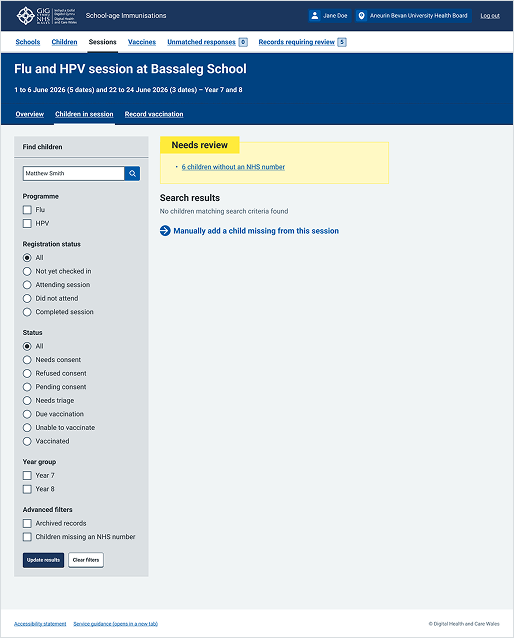
This example shows a session overview page from the School-age Immunisations service within WIS. It uses a warning callout at the top of the search results area to draw immediate attention to data that requires urgent administrator action.
Welsh Immunisation System (WIS)
This example shows the "All appointments" page from the Mass Vaccination service within WIS. It uses a warning callout component directly above the appointment list to draw immediate attention to critical guidance.