Back link
Updated in October 2026
Use back links to help users go back to the previous page in a multi-page transaction.
<a class="nhsw-back-link" href="/previous-page">Back</a>{% from "back-link/macro.njk" import nhswBackLink %}
{{ nhswBackLink({
text: "Back",
href: "/previous-page"
}) }}When to use a back link
Use back links in transactional services and multi-page forms to help users return to the previous step. This allows them to review or change their answers.
Back links are recommended on question pages. Read more about Question pages in the GOV.UK Design System.
You can also use back links on other pages in a multi-page journey where users may need to return to an earlier step.
When not to use a back link
Do not use a back link to start a service or complete an action. Use a button for actions such as continuing to the next step, saving information or submitting a form.
Do not use a back link on content pages, for example service information pages or accessibility statements. Users may arrive on these pages in different ways, so a back link may not take them where they expect.
Do not use a back link and breadcrumbs on the same page.
How to use a back link
Use "Back" as the link text. If research shows that different wording helps users understand where the link will take them, use that instead.
The back link should return users to the previous page in the same state they left it, including any information they entered or selected.
Place the back link at the top left of the page.
If you place it somewhere else, make sure it is not close to other links or buttons where it could distract users or be mistaken for another action. Make sure the page content is read in a logical order by screen readers.
Back link as a button
You can render the back link as a button element if necessary in order to post form data back to the previous page.
Accessibility
If a user goes back to a previous page, make sure information they have already entered is pre-populated.
Do not pre-populate if the information is no longer valid, or when pre-populating would be a major safety or security concern. This is to comply with WCAG 2.2 Success Criterion 3.3.7 Redundant Entry, level A.
Do not place other interactive elements too close to the back link. Leave enough space for users to easily select the link. This is to comply with WCAG 2.2 Success Criterion 2.5.8 Target Size, level AA.
When using the back link on a dark background, make sure all users can see it. The background colour must have a contrast ratio of at least 4.5:1 against white to meet WCAG 2.2 Success Criterion 1.4.3 Contrast (Minimum), level AA.
Source
Learn more about Back links in the GOV.UK Design System.
Back link variants
Back link on dark backgrounds
<a class="nhsw-back-link nhsw-back-link--reverse" href="/previous-page">Back</a>{{ nhswBackLink({
text: "Back",
href: "/previous-page",
classes: "nhsw-back-link--reverse"
}) }}Use this back link variant on dark backgrounds where the standard action link may not provide sufficient contrast.
Examples
Welsh Immunisation System (WIS)
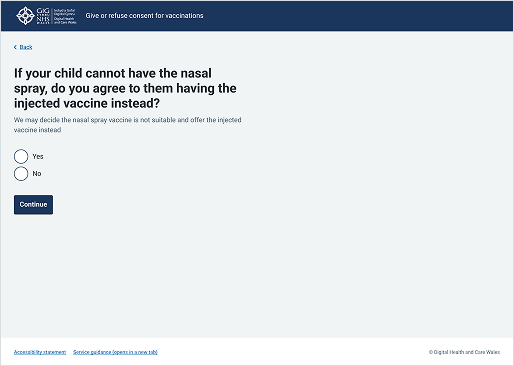
This example is from the School-age Immunisations service within WIS. The back link is positioned at the top left of the page and remains available throughout the multi-page form, helping users move back through the journey if needed.