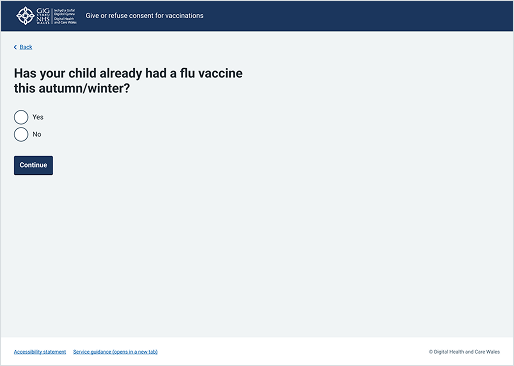
Footer
Updated in October 2026
Use the footer to provide consistent navigation and access to supporting information that users expect to find across DHCW services.
<footer class="nhsw-site-footer">
<div class="nhsw-site-footer__container">
<ul class="nhsw-site-footer__links">
<li><a class="nhsw-link" href="/accessibility">Accessibility statement</a></li>
<li><a class="nhsw-link" href="/guidance">Service guidance (opens in a new tab)</a></li>
</ul>
<p class="nhsw-body-s nhsw-site-footer__copyright">© Digital Health and Care Wales</p>
</div>
</footer>{% from "footer/macro.njk" import nhswFooter %}
{{ nhswFooter({
links: [
{ text: "Accessibility statement", href: "/accessibility" },
{ text: "Service guidance (opens in a new tab)", href: "/guidance" }
]
}) }}When to use the footer
Use the public-facing footer on websites and services used by members of the public. It helps users recognise they are on an NHS Wales service and provides links they expect to find at the bottom of a page. Do not use this footer in mobile apps.
For internal-facing services, use the footer designed for services that are not hosted on a service.nhs.wales domain.
If you use the page template, the footer is included automatically and does not need to be added separately.
How to use the footer
Important: Teams are responsible for footer content
Standard footer content may not meet the needs of your service. Make sure footer content reflects the needs of your users and any organisational, clinical, legal or regulatory requirements.
Adding links
You can add links to:
- your service's privacy notice
- your service's accessibility statement
- your service's cookies page
- terms and conditions
- help and support content
Use 'Privacy', 'Accessibility', 'Cookies' and 'Terms and conditions' for the link text.
If you include links to 'help' pages within the footer component, make sure to place those links consistently within the footer content.
Keep links to a minimum, especially in a transactional journey. Too many links can distract users. Link to specific policies for the transaction, if appropriate.
If your total number of links is less than seven, arrange them horizontally in lines.
Copyright
Your copyright statement must reflect the ownership of your website or service.
Include a reference to the Open Government Licence if your organisation or service encourages people to reuse and adapt its information under the licence. Contact your legal team for advice.
Accessibility
Make sure users can find help links in a consistent place on each page. Read the NHS England Design System guidance on consistent help links.
If you include links to "help" pages in a footer, make sure to place those links consistently in the footer content. Also make sure that "help" links always work in a similar way across each page. This supports WCAG 2.2 Success Criterion 3.2.6 Consistent Help, level A.
Source
Learn more about Footers in the NHS England Design System.
Follow discussions about Footers on NHS England GitHub to see the latest updates and resolved issues.
Footer variants
Footer without links
<footer class="nhsw-site-footer">
  <div class="nhsw-site-footer__container">
    <p class="nhsw-body-s nhsw-site-footer__org">© Digital Health and Care Wales</p>
    <p class="nhsw-body-s nhsw-site-footer__version">Product version information</p>
  </div>
</footer>
{{ nhswFooter({
organisation: "© Digital Health and Care Wales",
versionText: "Product version information"
}) }}Footer with an open licence
<footer class="nhsw-site-footer">
<div class="nhsw-site-footer__container nhsw-site-footer__container--stacked">
<ul class="nhsw-site-footer__links">
<li><a class="nhsw-link" href="/accessibility">Accessibility statement</a></li>
<li><a class="nhsw-link" href="/cookies">Cookie policy</a></li>
<li><a class="nhsw-link" href="/privacy">Privacy policy</a></li>
<li><a class="nhsw-link" href="/terms">Terms of use</a></li>
<li><a class="nhsw-link" href="/sitemap">Site map</a></li>
</ul>
<div class="nhsw-site-footer__licence">
<svg class="nhsw-site-footer__licence-badge" width="50" height="25" viewBox="0 0 500 250" aria-hidden="true" focusable="false"><path fill="#0b0c0c" fill-rule="evenodd" d="M111 39L134 39L156 45L181 61L191 72L197 82L206 69L221 55L241 44L255 40L290 40L306 45L321 53L338 68L344 76L344 80L308 103L297 91L288 86L281 84L264 84L257 86L245 93L236 104L231 118L231 132L237 148L245 157L254 163L269 167L282 166L296 160L299 157L296 151L289 145L289 143L281 136L279 132L349 132L349 209L346 209L330 190L313 202L295 209L285 211L260 211L250 209L230 201L217 192L205 180L198 168L188 182L174 195L154 206L140 210L104 210L88 205L72 196L54 179L41 156L36 135L36 115L38 104L48 80L55 70L67 58L86 46ZM407 39L408 165L462 165L462 209L363 209L363 67ZM114 84L99 90L87 102L81 117L81 133L89 151L102 162L119 167L132 166L147 159L158 147L164 130L163 115L156 100L144 89L131 84Z"/></svg>
<p class="nhsw-body-s nhsw-site-footer__licence-text">All content is available under the <a class="nhsw-link" href="/licence">Open Government Licence v3.0</a>, except where otherwise stated.</p>
</div>
<p class="nhsw-body-s nhsw-site-footer__copyright">© Digital Health and Care Wales</p>
</div>
</footer>{{ nhswFooter({
links: [
{ text: "Accessibility statement", href: "/accessibility" },
{ text: "Cookie policy", href: "/cookies" },
{ text: "Privacy policy", href: "/privacy" },
{ text: "Terms of use", href: "/terms" },
{ text: "Site map", href: "/sitemap" }
],
licence: {
text: "Open Government Licence v3.0",
href: "/licence"
}
}) }}If your service encourages people to reuse and adapt its information under the Open Government Licence, show the licence statement below the links and above the copyright line, each as its own row.
Examples
Welsh Immunisation System (WIS)
This example shows a public-facing consent page from the School-age Immunisations service featuring a standardised footer at the very bottom of the screen. It establishes trust by confirming it is an official NHS Wales digital service while providing a predictable, out-of-the-way location for essential resources like the accessibility statement and service guidance.