Summary list
Updated in October 2026
Use the summary list to summarise information, for example, a user's responses at the end of a form.
Carys Jenkins
<div class="nhsw-summary-card">
  <div class="nhsw-summary-card__header">
    <h2 class="nhsw-h3 nhsw-summary-card__title">Carys Jenkins</h2>
    <ul class="nhsw-summary-card__actions">
      <li><a class="nhsw-link" href="/cancel">Cancel</a></li>
      <li><a class="nhsw-link" href="/reschedule">Reschedule</a></li>
    </ul>
  </div>
  <div class="nhsw-summary-card__body">
    <dl class="nhsw-summary-list">
      <div class="nhsw-summary-list__row">
        <dt class="nhsw-summary-list__key">Name</dt>
        <dd class="nhsw-summary-list__value">Carys Jenkins</dd>
        <dd class="nhsw-summary-list__actions">
          <a class="nhsw-link" href="/change-name">Change<span class="nhsw-visually-hidden"> name</span></a>
        </dd>
      </div>
      <div class="nhsw-summary-list__row">
        <dt class="nhsw-summary-list__key">Appointment date</dt>
        <dd class="nhsw-summary-list__value">15 March 2027</dd>
        <dd class="nhsw-summary-list__actions">
          <a class="nhsw-link" href="/change-date">Change<span class="nhsw-visually-hidden"> appointment date</span></a>
        </dd>
      </div>
      <div class="nhsw-summary-list__row">
        <dt class="nhsw-summary-list__key">Contact details</dt>
        <dd class="nhsw-summary-list__value">
          <p>07700 900362</p>
          <p>carys.jenkins@example.com</p>
        </dd>
        <dd class="nhsw-summary-list__actions">
          <a class="nhsw-link" href="/change-contact-details">Change<span class="nhsw-visually-hidden"> contact details</span></a>
        </dd>
      </div>
    </dl>
  </div>
</div>
{% from "summary-card/macro.njk" import nhswSummaryCard %}
{{ nhswSummaryCard({
title: "Carys Jenkins",
actions: [
{ text: "Cancel", href: "/cancel" },
{ text: "Reschedule", href: "/reschedule" }
],
rows: [
{
key: { text: "Name" },
value: { text: "Carys Jenkins" },
actions: { items: [ { href: "/change-name", text: "Change", visuallyHiddenText: "name" } ] }
},
{
key: { text: "Appointment date" },
value: { text: "15 March 2027" },
actions: { items: [ { href: "/change-date", text: "Change", visuallyHiddenText: "appointment date" } ] }
},
{
key: { text: "Contact details" },
value: { html: "<p>07700 900362</p><p>carys.jenkins@example.com</p>" },
actions: { items: [ { href: "/change-contact-details", text: "Change", visuallyHiddenText: "contact details" } ] }
}
]
}) }}When to use summary lists
Use a summary list to present key information in a clear, easy-to-scan format. Summary lists are often used to help users review information before taking an action, such as submitting a form.
When not to use summary lists
The summary list uses the description list <dl> HTML element, so only use it to present information that has a key and at least 1 value.
Do not use it for tabular data or a simple list of information or tasks, like a task list page. For those, use a <table>, <ul> or <ol>. Read more about the Complete multiple tasks pattern in the NHS England Design System.
How to use summary lists
Use the summary list component to present pairs of related information, known as key-value pairs, in a list, where:
- the key is a label, like "Name"
- the value is the piece of information itself, like "John Smith"
Summary lists help users review information quickly and can be used alongside other components and patterns, such as the Check answers pattern from the NHS England Design System, to give users confidence and control before they continue.
Accessibility
Make sure any "Change" or other action links are at least 24px by 24px in size, or have adequate spacing. This is to make sure users can easily interact with the links. This supports WCAG 2.2 Success Criterion 2.5.8 Target Size, level AA.
When users go back to a previous answer through a link, pre-populate any information they have already entered.
Do not pre-populate information that is no longer valid, or where doing so would create a safety or security risk. This supports WCAG 2.2 Success Criterion 3.3.7 Redundant Entry, level A.
Source
Learn more about Summary lists in the NHS England Design System.
Follow discussions about Summary lists on NHS England GitHub to see the latest updates and resolved issues.
Summary list variants
Summary list with actions
Carys Jenkins
<div class="nhsw-summary-card">
  <div class="nhsw-summary-card__header">
    <h2 class="nhsw-h3 nhsw-summary-card__title">Carys Jenkins</h2>
    <ul class="nhsw-summary-card__actions">
      <li><a class="nhsw-link" href="/cancel">Cancel</a></li>
      <li><a class="nhsw-link" href="/reschedule">Reschedule</a></li>
    </ul>
  </div>
  <div class="nhsw-summary-card__body">
    <dl class="nhsw-summary-list">
      <div class="nhsw-summary-list__row">
        <dt class="nhsw-summary-list__key">Name</dt>
        <dd class="nhsw-summary-list__value">Carys Jenkins</dd>
        <dd class="nhsw-summary-list__actions"><a class="nhsw-link" href="/change-name">Change</a></dd>
      </div>
      <div class="nhsw-summary-list__row">
        <dt class="nhsw-summary-list__key">Appointment date</dt>
        <dd class="nhsw-summary-list__value">15 March 2027</dd>
        <dd class="nhsw-summary-list__actions"><a class="nhsw-link" href="/change-date">Change</a></dd>
      </div>
      <div class="nhsw-summary-list__row">
        <dt class="nhsw-summary-list__key">Contact details</dt>
        <dd class="nhsw-summary-list__value"><p>07700 900362</p><p>carys.jenkins@example.com</p></dd>
        <dd class="nhsw-summary-list__actions"><a class="nhsw-link" href="/change-contact-details">Change</a></dd>
      </div>
    </dl>
  </div>
</div>
{% from "summary-card/macro.njk" import nhswSummaryCard %}
{{ nhswSummaryCard({
title: "Carys Jenkins",
actions: [ { text: "Cancel", href: "/cancel" }, { text: "Reschedule", href: "/reschedule" } ],
rows: [
{
key: { text: "Name" },
value: { text: "Carys Jenkins" },
actions: { items: [ { text: "Change", href: "/change-name" } ] }
},
{
key: { text: "Appointment date" },
value: { text: "15 March 2027" },
actions: { items: [ { text: "Change", href: "/change-date" } ] }
},
{
key: { text: "Contact details" },
value: { html: "<p>07700 900362</p><p>carys.jenkins@example.com</p>" },
actions: { items: [ { text: "Change", href: "/change-contact-details" } ] }
}
]
}) }}You can add actions to a summary list, like a "Change" link to let users go back and edit their answer.
People who use assistive technology, like a screen reader, may hear the links out of context and not know what they do. To give more context, add visually hidden text to the links. This means a screen reader user will hear a meaningful action, like "Change name" or "Change date of birth".
Summary list without actions
Summary card header
- Name
- Carys Jenkins
- Date of birth
- 11 December 1975
- Contact details
07700 900362
carys.jenkins@example.com
<div class="nhsw-summary-card">
  <div class="nhsw-summary-card__header">
    <h2 class="nhsw-h3 nhsw-summary-card__title">Summary card header</h2>
  </div>
  <div class="nhsw-summary-card__body">
    <dl class="nhsw-summary-list">
      <div class="nhsw-summary-list__row">
        <dt class="nhsw-summary-list__key">Name</dt>
        <dd class="nhsw-summary-list__value">Carys Jenkins</dd>
      </div>
      <div class="nhsw-summary-list__row">
        <dt class="nhsw-summary-list__key">Date of birth</dt>
        <dd class="nhsw-summary-list__value">11 December 1975</dd>
      </div>
      <div class="nhsw-summary-list__row">
        <dt class="nhsw-summary-list__key">Contact details</dt>
        <dd class="nhsw-summary-list__value"><p>07700 900362</p><p>carys.jenkins@example.com</p></dd>
      </div>
    </dl>
  </div>
</div>
{% from "summary-card/macro.njk" import nhswSummaryCard %}
{{ nhswSummaryCard({
title: "Summary card header",
rows: [
{
key: { text: "Name" },
value: { text: "Carys Jenkins" }
},
{
key: { text: "Date of birth" },
value: { text: "11 December 1975" }
},
{
key: { text: "Contact details" },
value: { html: "<p>07700 900362</p><p>carys.jenkins@example.com</p>" }
}
]
}) }}Summary list without actions or borders
- Name
- Carys Jenkins
- Date of birth
- 11 December 1975
- Contact information
17 Clos y Nant
Carmarthen
SA31 9ZZ
- Contact details
07700 900362
carys.jenkins@example.com
<dl class="nhsw-summary-list nhsw-summary-list--no-border">
  <div class="nhsw-summary-list__row">
    <dt class="nhsw-summary-list__key">Name</dt>
    <dd class="nhsw-summary-list__value">Carys Jenkins</dd>
  </div>
  <div class="nhsw-summary-list__row">
    <dt class="nhsw-summary-list__key">Date of birth</dt>
    <dd class="nhsw-summary-list__value">11 December 1975</dd>
  </div>
  <div class="nhsw-summary-list__row">
    <dt class="nhsw-summary-list__key">Contact information</dt>
    <dd class="nhsw-summary-list__value"><p>17 Clos y Nant</p><p>Carmarthen</p><p>SA31 9ZZ</p></dd>
  </div>
  <div class="nhsw-summary-list__row">
    <dt class="nhsw-summary-list__key">Contact details</dt>
    <dd class="nhsw-summary-list__value"><p>07700 900362</p><p>carys.jenkins@example.com</p></dd>
  </div>
</dl>
{% from "summary-list/macro.njk" import nhswSummaryList %}
{{ nhswSummaryList({
classes: "nhsw-summary-list--no-border",
rows: [
{ key: { text: "Name" }, value: { text: "Carys Jenkins" } },
{ key: { text: "Date of birth" }, value: { text: "11 December 1975" } },
{ key: { text: "Contact information" }, value: { html: "<p>17 Clos y Nant</p><p>Carmarthen</p><p>SA31 9ZZ</p>" } },
{ key: { text: "Contact details" }, value: { html: "<p>07700 900362</p><p>carys.jenkins@example.com</p>" } }
]
}) }}The borderless summary list may be helpful when your summary list does not include actions and the borders do not add value to the content.
<div class="nhsw-summary-card">
  <div class="nhsw-summary-card__header">
    <h2 class="nhsw-h3 nhsw-summary-card__title">Carys Jenkins</h2>
  </div>
  <div class="nhsw-summary-card__body">
    <dl class="nhsw-summary-list">
      <div class="nhsw-summary-list__row">
        <dt class="nhsw-summary-list__key">Name</dt>
        <dd class="nhsw-summary-list__value">Carys Jenkins</dd>
        <dd class="nhsw-summary-list__actions"><a class="nhsw-link" href="#">Change</a></dd>
      </div>
      <div class="nhsw-summary-list__row">
        <dt class="nhsw-summary-list__key">Appointment date</dt>
        <dd class="nhsw-summary-list__value">15 March 2027</dd>
        <dd class="nhsw-summary-list__actions"><a class="nhsw-link" href="#">Change</a></dd>
      </div>
      <div class="nhsw-summary-list__row">
        <dt class="nhsw-summary-list__key">Contact details</dt>
        <dd class="nhsw-summary-list__value"><p>07700 900362</p><p>carys.jenkins@example.com</p></dd>
        <dd class="nhsw-summary-list__actions"><a class="nhsw-link" href="#">Change</a></dd>
      </div>
    </dl>
  </div>
</div>
{% from "summary-card/macro.njk" import nhswSummaryCard %}
{{ nhswSummaryCard({
title: "Carys Jenkins",
rows: [
{
key: { text: "Name" },
value: { text: "Carys Jenkins" },
actions: { items: [ { text: "Change", href: "/change-name" } ] }
},
{
key: { text: "Appointment date" },
value: { text: "15 March 2027" },
actions: { items: [ { text: "Change", href: "/change-date" } ] }
},
{
key: { text: "Contact details" },
value: { html: "<p>07700 900362</p><p>carys.jenkins@example.com</p>" },
actions: { items: [ { text: "Change", href: "/change-contact-details" } ] }
}
]
}) }}Summary cards
If you're showing multiple summary lists on a page, you can show each list within a summary card. This lets you visually separate each summary list and give each a title and some actions.
Use summary cards when you need to show:
- multiple summary lists that all describe the same type of thing, such as people
- actions that will apply to all the items in a list
Summary cards are often used in case working systems to help users quickly view a set of information and related actions.
Do not use summary cards if you only need to show a small amount of related information. Use summary lists instead and structure them with headings if needed.
If you're showing summary cards at the end of a longer journey, you might want to familiarise the user with them earlier on, such as when the user reviews individual sections.
Card titles
Use the summary card's header area to give each summary list a title.
Each title must be unique and help identify what the summary list describes. For example, this could be the name of a specific person, organisation or professional qualification.
Try to keep titles short and relevant. You can use 1 or 2 important values in the summary list, such as the first and last name of a person.
Carys Jenkins
- Name
- Carys Jenkins
- Appointment date
- 15 March 2027
- Contact details
07700 900362
carys.jenkins@example.com
Ifan Hughes
- Name
- Ifan Hughes
- Appointment date
- 28 March 2027
- Contact details
07450 340339
ifan.hughes@example.com
<div class="nhsw-summary-card">
  <div class="nhsw-summary-card__header">
    <h2 class="nhsw-h3 nhsw-summary-card__title">Carys Jenkins</h2>
  </div>
  <div class="nhsw-summary-card__body">
    <dl class="nhsw-summary-list">
      <div class="nhsw-summary-list__row">
        <dt class="nhsw-summary-list__key">Name</dt>
        <dd class="nhsw-summary-list__value">Carys Jenkins</dd>
      </div>
      <div class="nhsw-summary-list__row">
        <dt class="nhsw-summary-list__key">Appointment date</dt>
        <dd class="nhsw-summary-list__value">15 March 2027</dd>
      </div>
      <div class="nhsw-summary-list__row">
        <dt class="nhsw-summary-list__key">Contact details</dt>
        <dd class="nhsw-summary-list__value"><p>07700 900362</p><p>carys.jenkins@example.com</p></dd>
      </div>
    </dl>
  </div>
</div>

<div class="nhsw-summary-card">
  <div class="nhsw-summary-card__header">
    <h2 class="nhsw-h3 nhsw-summary-card__title">Ifan Hughes</h2>
  </div>
  <div class="nhsw-summary-card__body">
    <dl class="nhsw-summary-list">
      <div class="nhsw-summary-list__row">
        <dt class="nhsw-summary-list__key">Name</dt>
        <dd class="nhsw-summary-list__value">Ifan Hughes</dd>
      </div>
      <div class="nhsw-summary-list__row">
        <dt class="nhsw-summary-list__key">Appointment date</dt>
        <dd class="nhsw-summary-list__value">28 March 2027</dd>
      </div>
      <div class="nhsw-summary-list__row">
        <dt class="nhsw-summary-list__key">Contact details</dt>
        <dd class="nhsw-summary-list__value"><p>07450 340339</p><p>ifan.hughes@example.com</p></dd>
      </div>
    </dl>
  </div>
</div>
{% from "summary-card/macro.njk" import nhswSummaryCard %}
{{ nhswSummaryCard({
title: "Carys Jenkins",
rows: [
{
key: { text: "Name" },
value: { text: "Carys Jenkins" }
},
{
key: { text: "Appointment date" },
value: { text: "15 March 2027" }
},
{
key: { text: "Contact details" },
value: { html: "<p>07700 900362</p><p>carys.jenkins@example.com</p>" }
}
]
}) }}
{{ nhswSummaryCard({
title: "Ifan Hughes",
rows: [
{
key: { text: "Name" },
value: { text: "Ifan Hughes" }
},
{
key: { text: "Appointment date" },
value: { text: "28 March 2027" }
},
{
key: { text: "Contact details" },
value: { html: "<p>07450 340339</p><p>ifan.hughes@example.com</p>" }
}
]
}) }}Card actions
You can add card actions in the header, which will be shown after the summary card's title.
For example, if you have multiple rows with "change" actions that all take the user to the same place, you can show a single "change" card action instead. This helps avoid repeating the same row action on every row.
Card actions are shown in bold text to make them visually distinct from row actions. They help alert the user that the card action will affect the entire summary card.
Write link text for card actions to tell the user what it will do and that it will apply to the entire summary card. It should also be as short as possible, usually 2 words.
Example card actions include:
- Remove appointment
- Edit appointment
- Update issue
- Approve application
- Cancel order
Keep it short and do not add more than 2 to 3 actions in a header.
If a card action cannot easily be undone or might have serious consequences, consider adding a warning or asking the user for confirmation.
Showing missing information
In some contexts, you might need to show rows that have missing information. This can happen when:
- a user returns to an incomplete journey
- you've added or changed the questions in a service
Show a link to the appropriate question page in the value column so the user can enter the missing information, instead of showing a "change" link on that row.
Examples
Welsh Immunisation System (WIS)
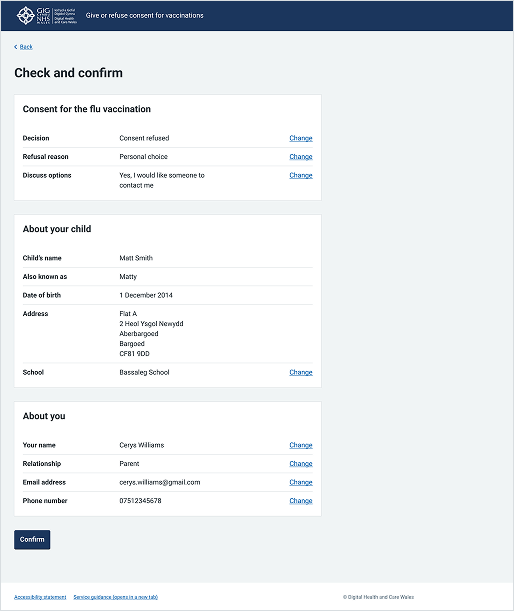
This example shows a "Check and confirm" page from the public-facing section of the School-age Immunisations service within WIS where a parent or guardian is completing a vaccination consent form. It uses a series of summary lists to organise complex user responses clearly.
Choose Pharmacy
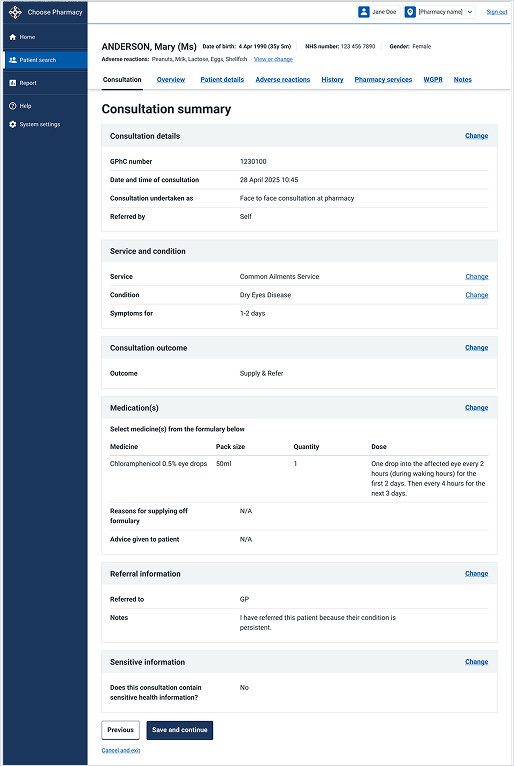
This example shows a "Consultation summary" screen within the clinical workflow of the Choose Pharmacy service. It demonstrates a comprehensive summary list used by clinicians to review all collected patient and clinical data before finalising the record.