Table
Updated in October 2026
Use a table to make it easier for users to compare and scan information.
| Skin symptoms | Possible cause |
|---|---|
| Blisters on lips or around the mouth | Cold sores |
| Itchy, dry, cracked, sore | Eczema |
| Itchy blisters | Shingles, chickenpox |
<table class="nhsw-table">
  <caption class="nhsw-table__caption nhsw-table__caption--m nhsw-caption-m">Skin symptoms and possible causes</caption>
  <thead class="nhsw-table__head">
    <tr class="nhsw-table__row">
      <th scope="col" class="nhsw-table__header">Skin symptoms</th>
      <th scope="col" class="nhsw-table__header">Possible cause</th>
    </tr>
  </thead>
  <tbody class="nhsw-table__body">
    <tr class="nhsw-table__row">
      <td class="nhsw-table__cell">Blisters on lips or around the mouth</td>
      <td class="nhsw-table__cell">Cold sores</td>
    </tr>
    <tr class="nhsw-table__row">
      <td class="nhsw-table__cell">Itchy, dry, cracked, sore</td>
      <td class="nhsw-table__cell">Eczema</td>
    </tr>
    <tr class="nhsw-table__row">
      <td class="nhsw-table__cell">Itchy blisters</td>
      <td class="nhsw-table__cell">Shingles, chickenpox</td>
    </tr>
  </tbody>
</table>
{% from "table/macro.njk" import nhswTable %}
{{ nhswTable({
caption: "Skin symptoms and possible causes",
captionSize: "m",
head: [
{ text: "Skin symptoms" },
{ text: "Possible cause" }
],
rows: [
[ { text: "Blisters on lips or around the mouth" }, { text: "Cold sores" } ],
[ { text: "Itchy, dry, cracked, sore" }, { text: "Eczema" } ],
[ { text: "Itchy blisters" }, { text: "Shingles, chickenpox" } ]
]
}) }}When to use a table
Use a table to organise structured data in rows and columns. This can help users scan, compare and find information easily, for example appointment details or vaccination reports.
When to not use a table
Never use the table component to layout content on a page. Instead, use the grid system.
How to use a table
Basic tables
Table captions
| Month you apply | Rate for vehicles |
|---|---|
| January | 95 |
| February | 55 |
| March | 125 |
<table class="nhsw-table">
<caption class="nhsw-table__caption nhsw-table__caption--l nhsw-caption-l">Months and rates</caption>
<thead class="nhsw-table__head">
<tr class="nhsw-table__row">
<th scope="col" class="nhsw-table__header">Month you apply</th>
<th scope="col" class="nhsw-table__header">Rate for vehicles</th>
</tr>
</thead>
<tbody class="nhsw-table__body">
<tr class="nhsw-table__row">
<th scope="row" class="nhsw-table__header">January</th>
<td class="nhsw-table__cell">£95</td>
</tr>
<tr class="nhsw-table__row">
<th scope="row" class="nhsw-table__header">February</th>
<td class="nhsw-table__cell">£55</td>
</tr>
<tr class="nhsw-table__row">
<th scope="row" class="nhsw-table__header">March</th>
<td class="nhsw-table__cell">£125</td>
</tr>
</tbody>
</table>{{ nhswTable({
caption: "Months and rates",
captionSize: "l",
head: [
{ text: "Month you apply" },
{ text: "Rate for vehicles" }
],
rows: [
[ { text: "January" }, { text: "£95" } ],
[ { text: "February" }, { text: "£55" } ],
[ { text: "March" }, { text: "£125" } ]
]
}) }}Use the <caption> element to describe a table in the same way you would use a heading. A caption helps users find, navigate and understand tables.
Table headers
Use table headers to tell users what the rows and columns represent.
Numbers in a table
| Group | Eligible people | Vaccinated |
|---|---|---|
| Aged 65 and over | 25,430 | 20,782 |
| At-risk adults | 14,215 | 10,663 |
| Healthcare staff | 8,942 | 7,481 |
<table class="nhsw-table">
<caption class="nhsw-table__caption nhsw-table__caption--m nhsw-caption-m">Vaccination uptake</caption>
<thead class="nhsw-table__head">
<tr class="nhsw-table__row">
<th scope="col" class="nhsw-table__header">Group</th>
<th scope="col" class="nhsw-table__header nhsw-table__header--numeric">Eligible people</th>
<th scope="col" class="nhsw-table__header nhsw-table__header--numeric">Vaccinated</th>
</tr>
</thead>
<tbody class="nhsw-table__body">
<tr class="nhsw-table__row">
<th scope="row" class="nhsw-table__header">Aged 65 and over</th>
<td class="nhsw-table__cell nhsw-table__cell--numeric">£25,430</td>
<td class="nhsw-table__cell nhsw-table__cell--numeric">£20,782</td>
</tr>
<tr class="nhsw-table__row">
<th scope="row" class="nhsw-table__header">At-risk adults</th>
<td class="nhsw-table__cell nhsw-table__cell--numeric">£14,215</td>
<td class="nhsw-table__cell nhsw-table__cell--numeric">£10,663</td>
</tr>
<tr class="nhsw-table__row">
<th scope="row" class="nhsw-table__header">Healthcare staff</th>
<td class="nhsw-table__cell nhsw-table__cell--numeric">£8,942</td>
<td class="nhsw-table__cell nhsw-table__cell--numeric">£7,481</td>
</tr>
</tbody>
</table>{{ nhswTable({
caption: "Vaccination uptake",
head: [
{ text: "Group" },
{ text: "Eligible people", format: "numeric" },
{ text: "Vaccinated", format: "numeric" }
],
rows: [
[ { text: "Aged 65 and over" }, { text: "25,430", format: "numeric" }, { text: "20,782", format: "numeric" } ],
[ { text: "At-risk adults" }, { text: "14,215", format: "numeric" }, { text: "10,663", format: "numeric" } ],
[ { text: "Healthcare staff" }, { text: "8,942", format: "numeric" }, { text: "7,481", format: "numeric" } ]
]
}) }}If you have numeric data, right align the column header and cells to make it easier to compare numbers.
Accessibility
Follow WebAIM's guidance for tables and:
- give tables captions
- use the scope attribute to associate the data cells with the appropriate headers
- let the browser window determine the width of the table whenever possible to reduce horizontal scrolling, this supports WCAG 2.2 Success Criterion 1.4.10 Reflow, level AA
Table captions
Use the <caption> element to describe a table in the same way you would use a heading. A caption helps users find, navigate and understand tables. This supports WCAG 2.2 Success Criterion 1.3.1 Info and Relationships, level A and WCAG 2.2 Success Criterion 2.4.6 Headings and Labels, level AA.
Style table captions to match the visual hierarchy of your page's content. If using Nunjucks, use the captionSize macro option. In HTML add the nhsw-table__caption--l class. You can use sizes s, m, l, or xl.
Table headers
Use table headers (<th>) to tell users what sort of data the rows and columns contain. The combination of row and column headers helps screen reader users identify the data in each cell. This supports WCAG 2.2 Success Criterion 1.3.1 Info and Relationships, level A.
If users need to refer to the first column to understand the context of a cell, for example a name or day of the week, make sure this column's cells are table headers with the scope="row" attribute.
Tables with a lot of data
If possible, you should aim to have less data in your tables. If you have a lot of data, try to organise it into multiple tables or multiple pages.
Responsive table
| Age | Vaccine | How it is given |
|---|---|---|
| 8 weeks | 6-in-1 vaccine | Injection into the thigh |
<table class="nhsw-table-responsive" role="table">
  <caption class="nhsw-table__caption nhsw-table__caption--m nhsw-caption-m">Vaccination schedule</caption>
  <thead class="nhsw-table__head" role="rowgroup">
    <tr class="nhsw-table__row" role="row">
      <th scope="col" class="nhsw-table__header" role="columnheader">Age</th>
      <th scope="col" class="nhsw-table__header" role="columnheader">Vaccine</th>
      <th scope="col" class="nhsw-table__header" role="columnheader">How it is given</th>
    </tr>
  </thead>
  <tbody class="nhsw-table__body" role="rowgroup">
    <tr class="nhsw-table__row" role="row">
      <th scope="row" class="nhsw-table__header" role="rowheader">
        <span class="nhsw-table-responsive__heading" aria-hidden="true">Age </span>
        8 weeks
      </th>
      <td class="nhsw-table__cell" role="cell">
        <span class="nhsw-table-responsive__heading" aria-hidden="true">Vaccine </span>
        6-in-1 vaccine
      </td>
      <td class="nhsw-table__cell" role="cell">
        <span class="nhsw-table-responsive__heading" aria-hidden="true">How it is given </span>
        Injection into the thigh
      </td>
    </tr>
  </tbody>
</table>
{{ nhswTable({
caption: { text: "Vaccination schedule", size: "m" },
responsive: true,
head: [ "Age", "Vaccine", "How it is given" ],
rows: [
[ "8 weeks", "6-in-1 vaccine", "Injection into the thigh" ]
]
}) }}The responsive table stacks vertically on small screens, using inline headings to label each cell.
Source
Learn more about Tables in the GOV.UK Design System.
Table variants
Displaying missing data
| Date | Vaccine | Product |
|---|---|---|
| 10 July 2026 | RSV | Abrysvo |
| 6 September 2023 | Flu | No data |
<table class="nhsw-table">
  <caption class="nhsw-table__caption nhsw-table__caption--m nhsw-caption-m">Vaccinations given</caption>
  <thead class="nhsw-table__head">
    <tr class="nhsw-table__row">
      <th scope="col" class="nhsw-table__header">Date</th>
      <th scope="col" class="nhsw-table__header">Vaccine</th>
      <th scope="col" class="nhsw-table__header">Product</th>
    </tr>
  </thead>
  <tbody class="nhsw-table__body">
    <tr class="nhsw-table__row">
      <th scope="row" class="nhsw-table__header">10 July 2026</th>
      <td class="nhsw-table__cell">RSV</td>
      <td class="nhsw-table__cell">Abrysvo</td>
    </tr>
    <tr class="nhsw-table__row">
      <th scope="row" class="nhsw-table__header">6 September 2023</th>
      <td class="nhsw-table__cell">Flu</td>
      <td class="nhsw-table__cell nhsw-u-secondary-text-colour">No data</td>
    </tr>
  </tbody>
</table>
{{ nhswTable({
caption: "Vaccinations given",
head: [
{ text: "Date" },
{ text: "Vaccine" },
{ text: "Product" }
],
rows: [
[ { text: "10 July 2026" }, { text: "RSV" }, { text: "Abrysvo" } ],
[ { text: "6 September 2023" }, { text: "Flu" }, { text: "No data", classes: "nhsw-u-secondary-text-colour" } ]
]
}) }}Do not leave empty cells in a table. The only exception can be the top left cell, where an empty cell may be needed to support the table structure.
If you have missing data, include some short text to explain why it's missing, such as:
- "No data"
- "Not applicable"
- "Not known"
To distinguish the text from other table content, use the nhsw-u-secondary-text-colour modifier class to make it dark grey.
Session row
You can use the session row to list items that require multiple layers of structured context (such as primary identifiers, secondary clinical metadata and status tags).
Standard session row
21 of 87 Free
11
<div class="nhsw-session-row">
  <div class="nhsw-session-row__main">
    <a class="nhsw-session-row__title" href="#">Children routine imms morning</a>
    <div class="nhsw-session-row__meta">
      <span class="nhsw-session-row__time">8am to 5pm</span>
      <span class="nhsw-session-row__divider" aria-hidden="true"></span>
      <a class="nhsw-link nhsw-session-row__recurring" href="#"><svg class="nhsw-session-row__icon" width="16" height="16" viewBox="0 0 24 24" fill="none" stroke="currentColor" stroke-width="2" aria-hidden="true" focusable="false"><path d="M17 2l4 4-4 4"/><path d="M3 11v-1a4 4 0 0 1 4-4h14"/><path d="M7 22l-4-4 4-4"/><path d="M21 13v1a4 4 0 0 1-4 4H3"/></svg> Recurring session</a>
    </div>
  </div>
  <div class="nhsw-session-row__detail">Diphtheria, tetanus, pertussis, polio, Hib and hepatitis B, Pneumococcal, Rotavirus</div>
  <div class="nhsw-session-row__badges">
    <strong class="nhsw-tag nhsw-tag--blue">To do<br>21 of 87</strong>
    <strong class="nhsw-tag nhsw-tag--white">Free<br>11</strong>
  </div>
  <svg class="nhsw-session-row__chevron" viewBox="0 0 24 24" fill="none" stroke="currentColor" stroke-width="2" focusable="false" aria-hidden="true">
    <path d="M9 6l6 6-6 6" />
  </svg>
</div>
{% from "session-row/macro.njk" import nhswSessionRow %}
{{ nhswSessionRow({
title: "Children routine imms morning",
meta: "8am to 5pm",
recurring: true,
detail: "Diphtheria, tetanus, pertussis, polio, Hib and hepatitis B, Pneumococcal, Rotavirus",
badges: [
{ label: "To do", value: "21 of 87" },
{ label: "Free", value: "11" }
],
href: "#"
}) }}Use the standard session row to show key information about a session.
It helps users compare sessions by displaying the session name, time, supporting information and status in a clear, scannable layout.
Session row with location
21 of 87 Free
11
<div class="nhsw-session-row">
  <div class="nhsw-session-row__main">
    <a class="nhsw-session-row__title" href="#">Children routine imms morning</a>
    <div class="nhsw-session-row__meta">
      <span class="nhsw-session-row__time">8am to 5pm</span>
      <span class="nhsw-session-row__divider" aria-hidden="true"></span>
      <a class="nhsw-link nhsw-session-row__recurring" href="#"><svg class="nhsw-session-row__icon" width="16" height="16" viewBox="0 0 24 24" fill="none" stroke="currentColor" stroke-width="2" aria-hidden="true" focusable="false"><path d="M17 2l4 4-4 4"/><path d="M3 11v-1a4 4 0 0 1 4-4h14"/><path d="M7 22l-4-4 4-4"/><path d="M21 13v1a4 4 0 0 1-4 4H3"/></svg> Recurring session</a>
    </div>
  </div>
  <div class="nhsw-session-row__detail">Diphtheria, tetanus, pertussis, polio, Hib and hepatitis B, Pneumococcal, Rotavirus</div>
  <div class="nhsw-session-row__location"><a class="nhsw-link" href="#">Four Elms Medical Centre</a></div>
  <div class="nhsw-session-row__badges">
    <strong class="nhsw-tag nhsw-tag--blue">To do<br>21 of 87</strong>
    <strong class="nhsw-tag nhsw-tag--white">Free<br>11</strong>
  </div>
  <svg class="nhsw-session-row__chevron" viewBox="0 0 24 24" fill="none" stroke="currentColor" stroke-width="2" focusable="false" aria-hidden="true">
    <path d="M9 6l6 6-6 6" />
  </svg>
</div>
{% from "session-row/macro.njk" import nhswSessionRow %}
{{ nhswSessionRow({
title: "Children routine imms morning",
meta: "8am to 5pm",
recurring: true,
detail: "Diphtheria, tetanus, pertussis, polio, Hib and hepatitis B, Pneumococcal, Rotavirus",
location: { text: "Four Elms Medical Centre", href: "#" },
badges: [
{ label: "To do", value: "21 of 87" },
{ label: "Free", value: "11" }
],
href: "#"
}) }}Use the session row with location when users need to know where a session takes place.
It includes a location alongside the session details, helping users find and compare sessions based on where they are delivered.
Examples
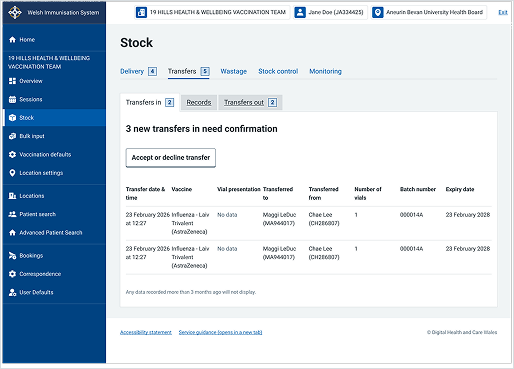
Welsh Immunisation System (WIS)
This example shows the "Transfers in" view under Stock management within WIS. It uses a table component to display structured inventory data in rows and columns.
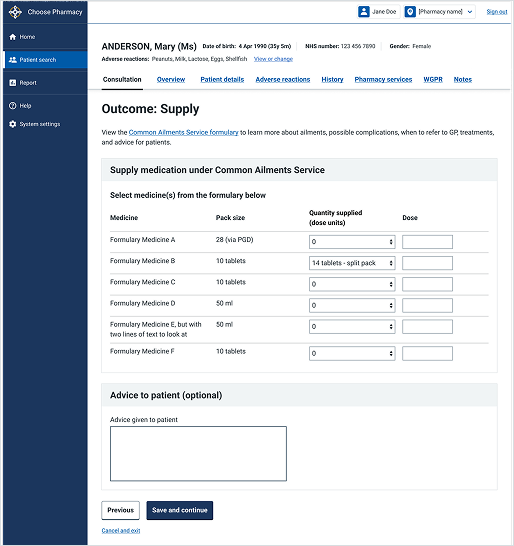
Choose Pharmacy
This example shows the "Outcome: Supply" screen within a consultation in Choose Pharmacy. It uses an interactive table component to present formulary options and record medication supplies.